Interior features
Selecting a play mode
In this manual: Interior features
~1min read
 Press the “TUNE/SEL” knob to select iPod menu mode.
 Turning the “TUNE/SEL” knob changes the play mode in the fol- lowing order:
“PLAYLISTS” → “ARTISTS” → “ALBUMS” → “SONGS” → “PODCASTS” → “GENRES” → “COMPOSERS” → “AUDIOBOOKS”
 Press the “TUNE/SEL” knob to select the desired play mode.
- Play mode list
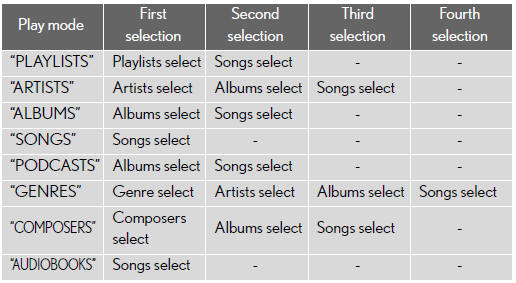
- Selecting a list
 Turn the “TUNE/SEL” knob to display the first selection list.
 Press the “TUNE/SEL” knob to select the desired item.
Pressing the knob changes to the second selection list.
 Repeat the same procedure to select the desired song name.
To return to the previous selection list, select “GO BACK” or press the 4 (  ) button.
Test yourself
A quick Lexus GX quiz: every answer comes with an explanation and a link to the manual page.
Was this page helpful?