Navigation system: route guidance
Route trace
In this manual: Navigation system: route guidance
~1min read
It is possible to store the traveled route up to 124 miles (200 km) and retrace the route on the display.
:INFORMATION
This feature is available on the map with more detailed map scale than 30 miles (50 km).
To start recording the route trace
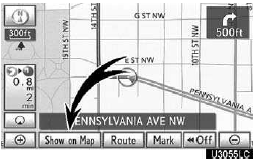
1. Touch “Show on Map”.
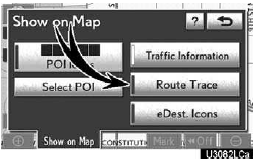
2. Touch “Route Trace”.
“Route Trace” indicator is highlighted.
To stop recording the route trace

1. Touch “Show on Map”.

2. Touch “Route Trace”. The following screen will be displayed.
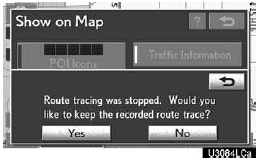
Touching “Yes” stops recording and the route trace remains displayed on the screen.
Touching “No” stops recording and the route trace is erased.
Test yourself
A quick Lexus GX quiz: every answer comes with an explanation and a link to the manual page.
Was this page helpful?