Quick reference (“Setup” screen)
The items shown on the “Setup” screen can be set. To display the “Setup” screen, push the “SETUP” button.
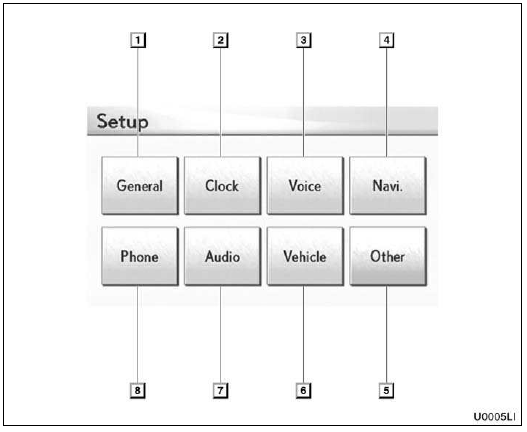
1. “General”
Settings are available for language selection, operation sounds, automatic screen change, etc.
2. “Clock”
Used for changing settings for time zones, daylight saving time, etc.
3. “Voice”
Voice guidance can be set.
4. “Navi.”
Settings are available for average cruising speed, displayed screen contents, POI icon categories, etc.
5. “Other”
Settings are available for Lexus Insider, XM Sports and Stocks.
6. “Vehicle”
Settings are available for vehicle information such as maintenance information.
7. “Audio”
Settings are available for portable audio devices, Bluetooth audio devices, etc.
8. “Phone”
Bluetooth phones and phone numbers can be registered, and the receiver volume can be adjusted.
Test yourself
A quick Lexus GX quiz: every answer comes with an explanation and a link to the manual page.