Command list
Recognizable voice commands and their actions are shown below.
• All commands are listed in the table.
• For devices that are not installed in the vehicle, the related commands will not be dis- played in the “Shortcut Menu” screen. Also, according to conditions, other commands may not be displayed in the “Shortcut Menu” screen.
• The functions available may vary according to the navigation system installed.
• Voice recognition language can be changed.
►“Set a Destination”
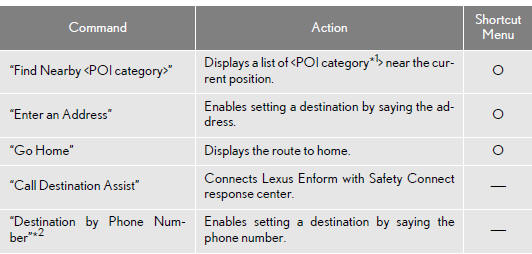
*1: For example; Gas stations, Restaurants, etc.
*2: To use this function, say “Main menu” and then “Set a destination” while the “Shortcut Menu” screen is being displayed.
►“Use the Phone” (For details, refer to “Owner’s Manual”.)
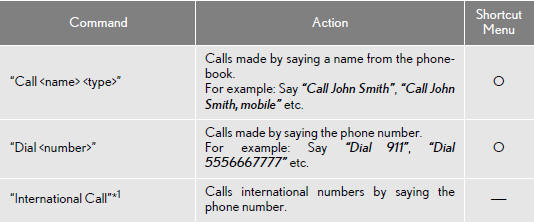
*1: To use this function, say “Main menu” and then “Use the phone” while the “Shortcut Menu” screen is being displayed.
►“Play Music”

*1: Say the desired artist name or album name in the place of the “
”.
*2: To use this function, say “Main menu” and then “Play music” while the “Shortcut menu” screen is being displayed.
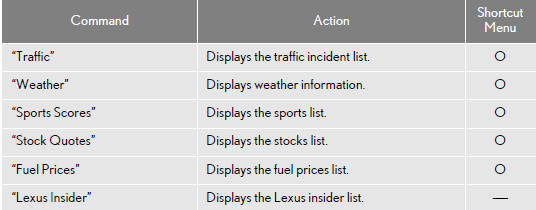
►“Get Information”
►Select audio mode
When Expanded Voice Commands are turned “On”.
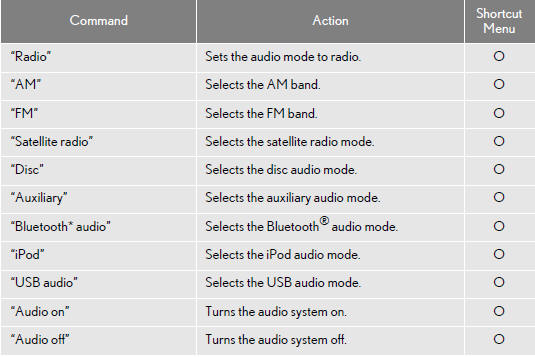
*: Bluetooth is a registered trademark of Bluetooth SIG, Inc.
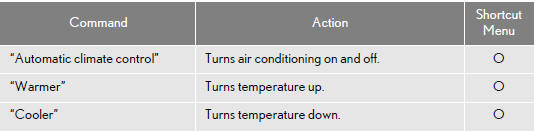
►Climate command
When Expanded Voice Commands are turned “On”.
INFORMATION
●Commands that have a “O” in the Shortcut Menu column can be recognized from the “Shortcut Menu” screen.
●Commands that have a “-” in the Shortcut Menu column can only be recognized from the screen that they are displayed in.
Test yourself
A quick Lexus LX quiz: every answer comes with an explanation and a link to the manual page.