Interior Features
Clock
In this manual: Interior Features
5steps
~30min
2/5difficulty
Done 0 of 5
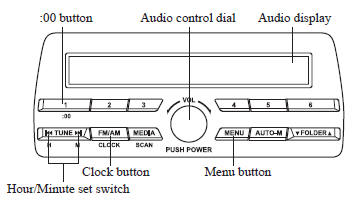
Setting the time
The clock can be set at any time when the ignition is switched to ACC or ON.
- To adjust the time, press the clock button (
 ) for about 2 seconds
until a beep is heard. - The clock's current time will flash.
Time adjustment
- To adjust the time, press the hour/ minute set button (
 ,
 ) while the
clock's current time is flashing. - The hours advance while the hour set button (
 ) is pressed. The
minutes advance while the minute set button ( ) is pressed.
- Press the clock button (
) again to start the clock.
Time resetting
- Press the clock button (
 ) for about
2 seconds until a beep is heard. - Press the :00 button ( 1 ).
- When the button is pressed, the time will be reset as follows: (Example)
12:01—12:2912:00 12:30—12:591:00
NOTE
- When the :00 button ( 1 ) is pressed, the seconds will start at “ 00 ”.
- Switching between 12 and 24-hour clock time: Press the menu button (
 )
several times until 12 and 24-hour clock time are displayed. Turn the audio control dial in either direction, select the desired clock setting while the preferred clock time is flashing
Test yourself
A quick Mazda 3 quiz: every answer comes with an explanation and a link to the manual page.
Was this page helpful?