When Driving
Drive Selection
In this manual: When Driving
~2min read
Drive selection is a system to switch the vehicle's drive mode. When the sport mode is selected, vehicle's response against accelerator operation is enhanced. This provides additional quick acceleration which may be needed to safely make maneuvers such as lane changes, merging onto freeways, or passing other vehicles.
CAUTION Do not use the sport mode when driving on slippery roads such as wet or snow-covered roads. It may cause tire slipping.NOTE
- When the sport mode is selected, driving at higher engine speeds increases and it may increase fuel consumption. Mazda recommends that you cancel the sport mode on normal driving.
- Drive mode cannot be switched in the following conditions:
- ABS/TCS/DSC is operating
- The Mazda Radar Cruise Control (MRCC) system/cruise control is operating.
- Steering wheel is being operated abruptly
Drive Selection Switch
The SPORT mode indicator light in the instrument cluster is illuminated while in SPORT mode.
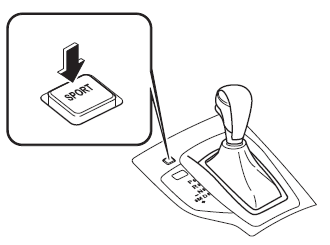
NOTE
- If the SET+ / SET- Switch of the Mazda Radar Cruise Control (MRCC) system/ cruise control is pressed while in SPORT mode, SPORT mode is automatically switched off.
- When the ignition is switched off, SPORT mode is also switch off.
- When SPORT mode is selected, the transaxle may automatically shift down or the vehicle speed may accelerate depending on the vehicle speed.
SPORT Mode Indicator Light
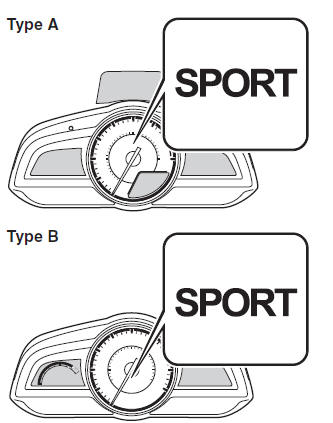
The light is illuminated while in SPORT mode.
NOTE The indicator light flashes a few times to indicate that the mode cannot be switched to SPORT mode even if the drive select switch is pressed under the following conditions:
- ABS/TCS/DSC is operating
- The Mazda Radar Cruise Control (MRCC) system/cruise control is operating.
- The vehicle is making a turn or driving on a curved road.
Test yourself
A quick Mazda 3 quiz: every answer comes with an explanation and a link to the manual page.
Was this page helpful?