Lighting System Personalization Features Setting Procedure
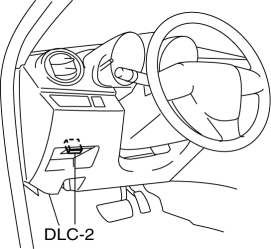
1. Connect the M-MDS (IDS) to the DLC-2.
2. After the vehicle is identified, select the following items from the initial screen of the IDS.
Select the “Module Programming”
Select the “Programmable Parameters”.
Select menu in the Exterior Lighting.
3. Select an item name, and then select option.
M-MDS display |
Function |
Initial setting |
Setting content |
Control unit |
Autolamp On Setting |
The auto light system sensitivity can be adjusted. |
Standard (Except Japan) |
Extra Low (Except Japan) / Low (Except Japan) / Standard (Except Japan) / High (Except Japan) / Extra High (Except Japan) |
BCM |
NOTE:
Other than the above conditions, an “Japan Only” command is also displayed, however, do not select the command because it is for use other than in Japan.
If the mode is set to “Extra High (Except Japan)” and “High (Except Japan)”, the illumination level for illuminating the TNS and headlight increases. Therefore, the TNS and headlights illuminate when the ambient light is brighter than when the level is set to “Standard (Except Japan)”. In addition, if the mode is set to “Low (Except Japan)” and “Extra Low (Except Japan)”, the illumination level for illuminating the TNS and headlights decreases. Therefore, the TNS and headlights illuminate when the ambient light is lower than when the level is set to “Standard (Except Japan)”.
The interior light control system and turn light system is controlled by the BCM. For the interior light control system setting, refer to the personalization function setting procedure..
Test yourself
A quick Mazda 3 quiz: every answer comes with an explanation and a link to the manual page.