Power Systems Personalization Features Setting Procedure
Use the IDS (laptop PC) because the PDS (Pocket PC) does not support the POWER SYSTEMS PERSONALIZATION FEATURES SETTING PROCEDURE.
1. Connect the M-MDS to the DLC–2.
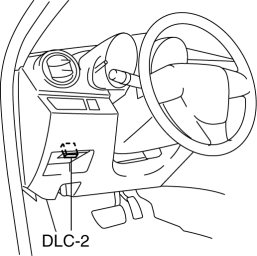
2. After the vehicle is identified, select the following items from the initial screen of the M-MDS.
Select the “Module Programming”.
3. Then, select items from the screen menu in the following order.
Select “Programmable Parameters”.
Select “RKE”.
4. Select an item name, and then select option.
M-MDS display |
Function |
Initial setting |
Setting content |
Control unit |
ACC auto off |
The function to automatically switch off the ignition after one hour has elapsed since the ignition was switched to ACC can be set to operable or inoperable. |
Enabled |
Disabled/Enabled |
Keyless control module |
Power off mode |
The transition pattern in which the ignition position is switched by pressing the push button start can be selected. |
Direct |
Direct/Stepwise |
Keyless control module |
Test yourself
A quick Mazda 3 quiz: every answer comes with an explanation and a link to the manual page.