Rearview Mirror
Rearview mirror adjustment
Before driving, adjust the rearview mirror to center on the scene through the rear window.
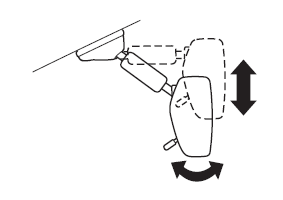
NOTE For the manual day/night mirror, perform the adjustment with the day/night lever in the day position.
Reducing glare from headlights
Manual day/night mirror
Push the day/night lever forward for day driving. Pull it back to reduce glare of headlights from vehicles at the rear.
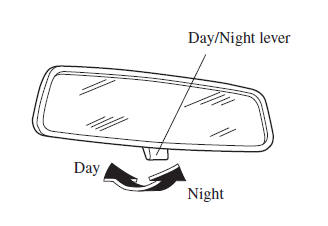
Auto-dimming mirror
The auto-dimming mirror automatically reduces glare of headlights from vehicles at the rear when the ignition is switched ON.
(With Homelink wireless control system)
Press the OFF button to cancel the automatic dimming function. The indicator light will turn off.
To reactivate the automatic dimming function, press the ON button . The indicator light will illuminate.
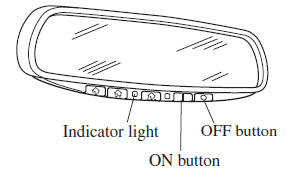
(Without Homelink wireless control system)
Press the ON/OFF button to cancel the automatic dimming function. The indicator light will turn off.
To reactivate the automatic dimming function, press the ON/OFF button . The indicator light will illuminate.
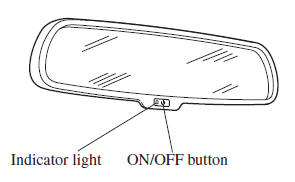
NOTE
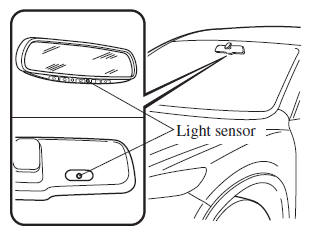
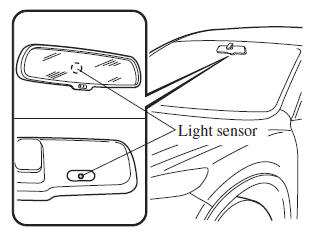
- Do not use glass cleaner or suspend objects on or around the light sensor.
Otherwise, light sensor sensitivity will be affected and may not operate normally.
(With Homelink wireless control system)
(Without Homelink wireless control system)
- (With Homelink wireless control system) For information regarding the 3 buttons (
 ,
 ,
 ) on the auto-dimming
mirror.Refer to HomeLink Wireless Control System on .
- The auto-dimmer function is canceled when the ignition is switched ON and the shift lever is in reverse (R).
Test yourself
A quick Mazda 3 quiz: every answer comes with an explanation and a link to the manual page.