Using Automatic Locking Mode
Follow these instructions when using a child-restraint system, unless you are attaching a LATCH-equipped childrestraint system to the rear LATCH lower anchors. Refer to “Using LATCH Lower Anchor” .
NOTE Follow the child-restraint system manufacturer's instructions carefully.
If you are not sure whether you have a LATCH system or tether, check in the child-restraint system manufacturer's instructions and follow them accordingly.
Depending on the type of child-restraint system, it may use LATCH system instead of seat belts or if the belt goes across the child's chest, may recommend against using automatic locking mode.
- Make sure the seatback is securely latched by pushing it back until it is fully locked.
- Raise the head restraint to the top locked position.
Refer to Head Restraints on .
- Secure the child-restraint system with the lap portion of the lap/shoulder belt.
See the manufacturer's instructions on the child-restraint system for belt routing instructions.
- To get the retractor into the automatic locking mode, pull the shoulder belt portion of the seat belt until the entire length of the belt is out of the retractor.
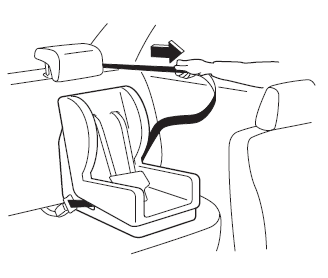
- Push the child-restraint system firmly into the vehicle seat. Be sure the belt retracts as snugly as possible. A clicking noise from the retractor will be heard during retraction if the system is in the automatic locking mode. If the belt does not lock the seat down tight, repeat this step.
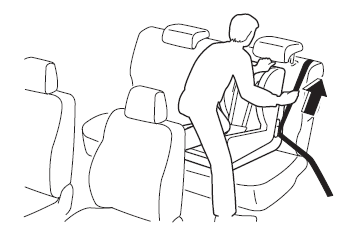
NOTE Inspect this function before each use of the child-restraint system. You should not be able to pull the shoulder belt out of the retractor while the system is in the automatic locking mode. When you remove the child-restraint system, be sure the belt fully retracts to return the system to emergency locking mode before occupants use the seat belts.
- If your child-restraint system requires the use of a tether strap, refer to the manufacturer's instructions to hook and tighten the tether strap.


Test yourself
A quick Mazda 3 quiz: every answer comes with an explanation and a link to the manual page.