Wheel Hub Component Removal/Installation
Performing the following procedures without first removing the ABS wheel-speed sensor may possibly cause an open circuit in the wiring harness if it is pulled by mistake. Before performing the following procedures, disconnect the ABS wheel-speed sensor connector (axle side) and fix the wiring harness to an appropriate place where it will not be pulled by mistake while servicing the vehicle.
1. Remove in the order indicated in the table.
2. Install in the reverse order of removal.
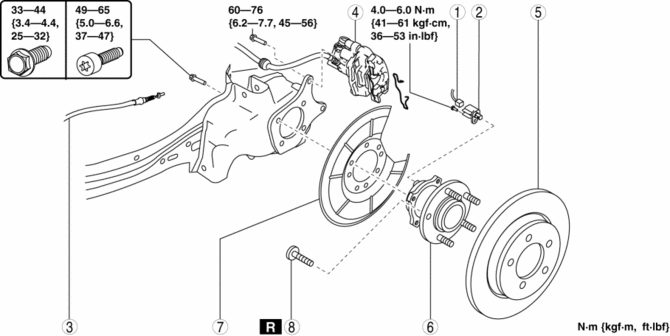
ABS wheel-speed sensor connector
ABS wheel-speed sensor
Rear parking brake cable
(See PARKING BRAKE LEVER REMOVAL/INSTALLATION.)
Brake caliper component
(See Brake Caliper Component Removal Note.)
(See REAR BRAKE (DISC) REMOVAL/INSTALLATION.)
Disc plate
Wheel hub component
Dust cover
Wheel hub bolt
(See Wheel Hub Bolt Removal Note.)
(See Wheel Hub Bolt Installation Note.)
Brake Caliper Component Removal Note
1. Remove the retaining clip and mounting support installing bolt.
2. Remove the brake caliper component from the trailing link and suspend it out of the way using a cable.
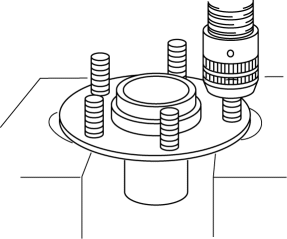
Wheel Hub Bolt Removal Note NOTE:The hub bolts do not need to be removed unless they are being replaced.
1. Remove the hub bolt using a press.
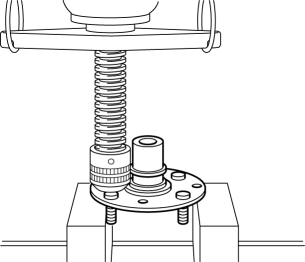
Wheel Hub Bolt Installation Note
1. Install the new hub bolt using a press.
Test yourself
A quick Mazda 3 quiz: every answer comes with an explanation and a link to the manual page.