Fuel Economy Monitor
The Control Status and Fuel Consumption are switched and displayed by operating each icon in the display.
In addition, after completing a trip, the total energy efficiency to date is displayed in the ending display when the ending display is turned on.
1. Select the  icon on the home
screen to display the applications screen.
2. Select the “Fuel Economy Monitor”.
3. Operate the commander switch or touch the screen and display the menu.
NOTE
When the menu is displayed by touching the screen, the display is hidden automatically after 6 seconds.
4. Select the icon in the menu and perform the operation. Each icon operates as follows:
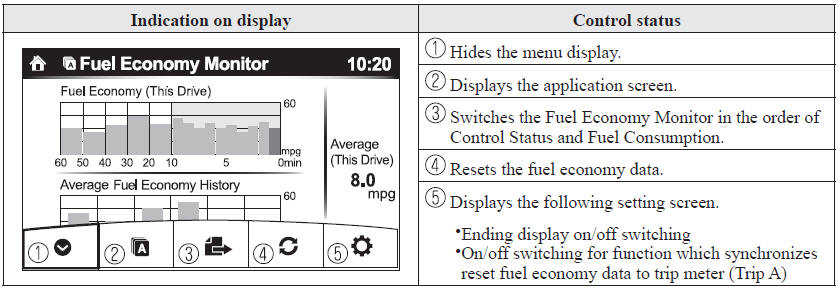
NOTE
The fuel economy monitor screen after the ignition is switched from ON to OFF is changed to the original fuel economy monitor screen when the ignition is switched ON the next time.
Fuel Consumption DisplayInformation regarding the fuel economy is displayed.
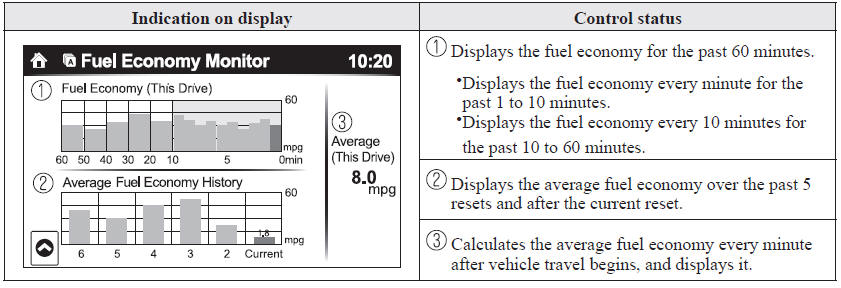
NOTE
- The fuel economy data can be reset by doing the following operation:
- Press the reset switch from the menu screen.
- When the function which synchronizes the fuel economy monitor and the trip meter is on, reset trip A of the trip meter.
- Delete the average fuel economy information displayed in the trip computer.
- After resetting the fuel economy data, “-- -
” is displayed while the average fuel economy is calculated.
The power generating status is displayed
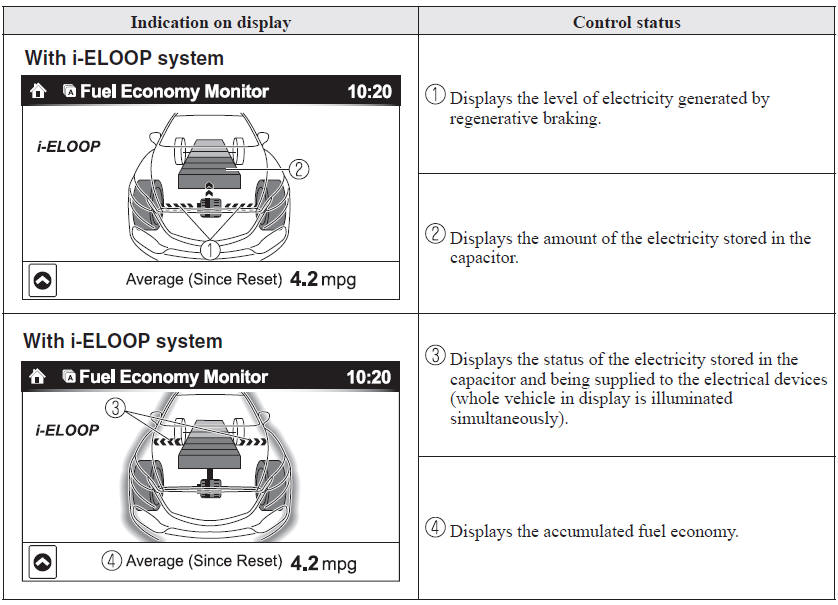
Ending Screen Display
If the ending display on the fuel economy monitor is on when the ignition is switched from ON to OFF, the information regarding the fuel economy is displayed.
Test yourself
A quick Mazda 6 quiz: every answer comes with an explanation and a link to the manual page.