Interior Features
Receiving an Incoming Call
In this manual: Interior Features
~1min read
When an incoming call is received, the incoming call notification screen is displayed. The “Incoming Call Notifications” setting must be on.
To accept the call, press the pick-up button on the audio control switch or select  on the screen.
To reject the call, press the hang-up button on the audio control switch or select  on the screen.
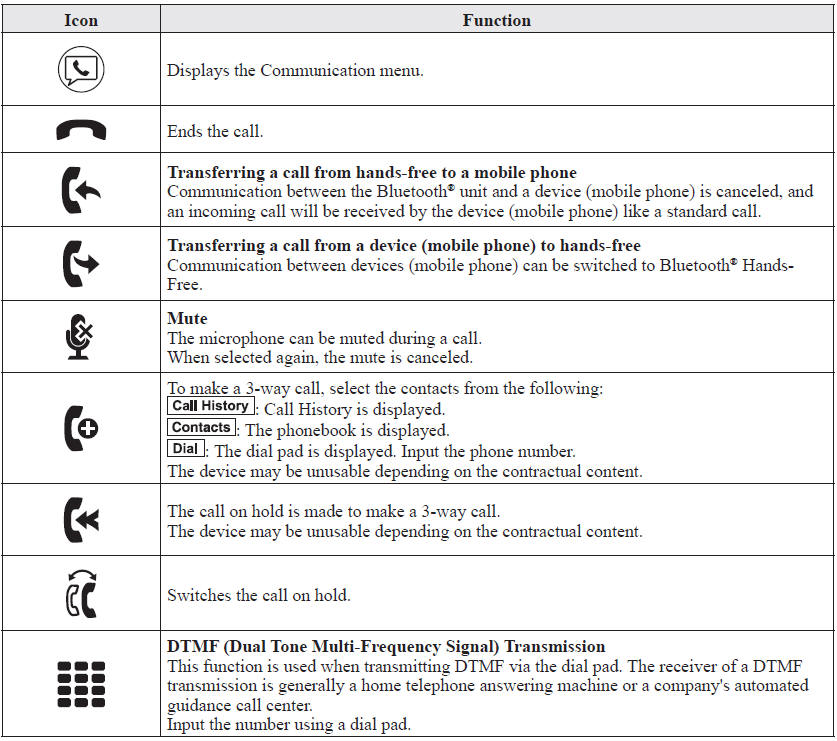
The following icons are displayed on the screen during a call. Icons which can be used differ depending on use conditions.
NOTE
- If the ignition is switched off during a hands-free call, the line is transferred to the device (Mobile phone) automatically.
- If the DTMF code has two or more digits or symbols, each one must be transmitted individually.
Test yourself
A quick Mazda 6 quiz: every answer comes with an explanation and a link to the manual page.
Was this page helpful?