Instruments and controls
Fog light switch
In this manual: Instruments and controls
~1min read
Front fog lights
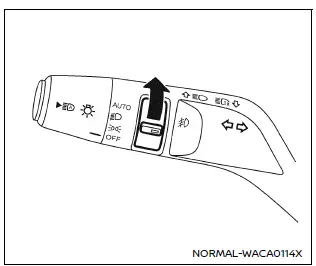
Front fog lights (example)
In the Nissan Armada, the front fog lights are designed to improve visibility in challenging weather conditions such as fog, rain, or snow by illuminating the road surface at a lower angle.
To activate the fog lights in the Nissan Armada, first rotate the headlight switch to the  position, and then turn the fog light switch to the
 position.
To turn the fog lights off, rotate the switch back to the OFF position. In the Nissan Armada, the fog lights will only operate when the low beam headlights are active and will automatically switch off when the high beams are engaged.
This ensures proper lighting distribution and prevents glare for other drivers.
Was this page helpful?