Starting and driving
How to enable/disable the I-BSI system
In this manual: Starting and driving
3steps
~18min
2/5difficulty
Done 0 of 3
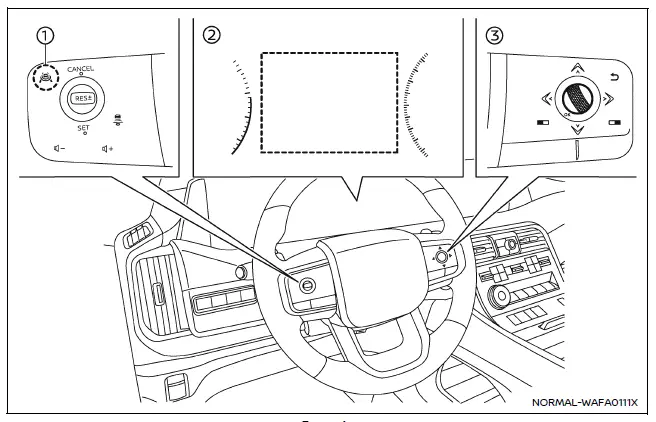
Example
- ProPILOT Assist switch (design may vary depending on the Nissan Armada model)
- Vehicle information display
- Steering-wheel-mounted control (right side)
To configure the Nissan Armada Intelligent Blind Spot Intervention (I-BSI) system, follow these steps:
1. Press the  button repeatedly until "Settings" appears in the vehicle information display, then confirm using the scroll dial.
Use the scroll dial to navigate to "Driver Assistance" and confirm your selection.
2. Select "Blind Spot Assist" and press the scroll dial.
3. Choose "Intervention" and confirm to access I-BSI settings.
4. Press the ProPILOT Assist switch to activate or deactivate the Nissan Armada I-BSI system as needed.
NOTE:
- Activating ProPILOT Assist in the Nissan Armada automatically enables both the I-BSI and Intelligent Lane Intervention (I-LI) systems simultaneously.
- The Nissan Armada retains the selected system settings even after the engine is turned off and restarted, ensuring consistent driver preferences.
Was this page helpful?