I-FCW system operation
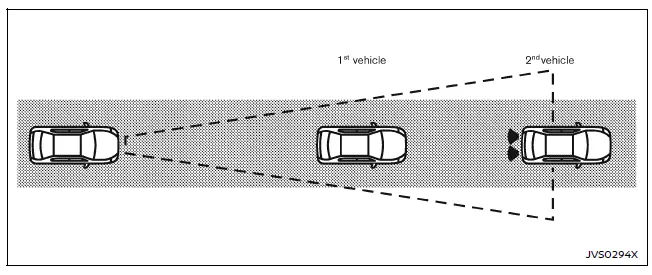
The Nissan Armada I-FCW system becomes active at speeds above approximately 5 km/h, ensuring functionality during most driving scenarios.
When a potential forward collision risk is detected, the Nissan Armada system immediately alerts the driver by flashing the vehicle-ahead detection indicator and emitting a clear audible warning signal, prompting timely driver response.
Turning the I-FCW system ON/OFF
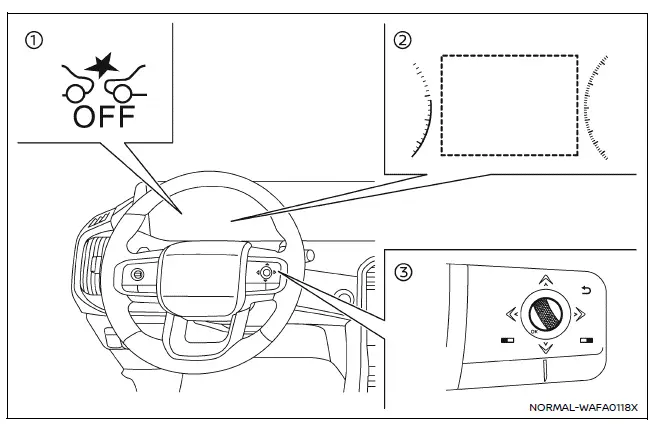
- AEB system OFF warning light (instrument panel)
- Vehicle information display
- Steering-wheel-mounted controls (right side)
Follow these steps to enable or disable the I-FCW system in the Nissan Armada:
1. Press the  button until "Settings" appears on the vehicle information display, then confirm using the scroll dial.
Use the scroll dial to navigate to "Driver Assistance," then press to confirm your selection.
2. Select "Emergency Brake" and press the scroll dial to turn the system ON or OFF according to your preference.
When the I-FCW system is disabled, the Nissan Armada AEB system OFF warning light (orange) will illuminate to inform the driver.
NOTE:
- The I-FCW system in the Nissan Armada automatically reactivates each time the engine is restarted.
- The I-FCW system is fully integrated with the AEB system and cannot be controlled independently.
Disabling the AEB system will also disable the I-FCW functionality.
- The I-FCW system cannot be switched ON or OFF while the Nissan Armada is in motion.