Driver Controls
Map Lamp
In this manual: Driver Controls
~2min read
Exploded View
Without Moonroof Models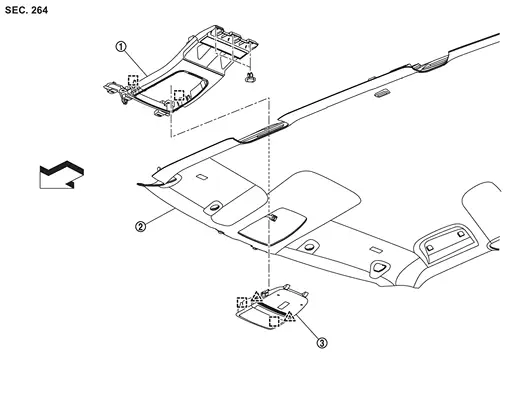
 |
Map lamp bracket |  |
Headlining assembly |  |
Map lamp assembly |
 |
: Pawl | ||||
 |
: Metal clip | ||||
| : vehicle front | |||||
With Moonroof Models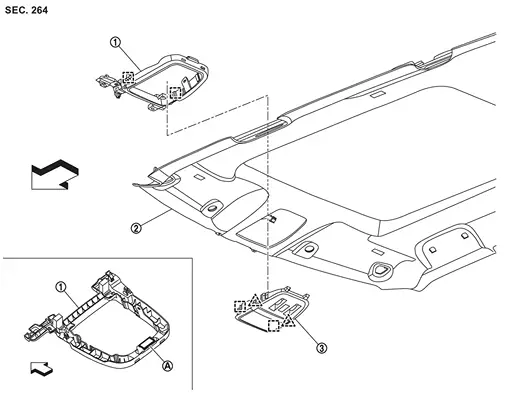
|
Map lamp bracket | |
Headlining assembly | |
Map lamp assembly |
 |
Dual-lock fastener | ||||
|
: Pawl | ||||
|
: Metal clip | ||||
| : vehicle front | |||||
Map Lamp
Removal and Installation
REMOVAL
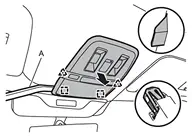
Disengage map lamp assembly fixing metal clips and pawls using a remover tool (A), and then pull out map lamp assembly from headlining assembly.
|
: Pawl |
|
: Metal clip |
Disconnect harness connectors, and then remove map lamp assembly.
INSTALLATION
Install in the reverse order of removal.
Replacement
Map Lamp Bracket
Removal and Installation
REMOVAL
Remove headlining assembly. Refer to Removal and Installation.
Disengage body harness fixing clips , and then remove body harness from map lamp bracket.

| : vehicle front |
Remove map lamp bracket.
- Without moonroof models
- Remove map lamp bracket fixing clips .
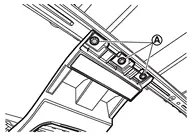
- Disengage fixing metal clips, and then remove map lamp bracket.
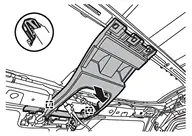
: Metal clip
- Remove map lamp bracket fixing clips
- With moonroof models
Disengage fixing metal clips and dual-lock fastener
according to numerical order 1→2 indicated by arrows as shown in the figure, and then remove map lamp bracket.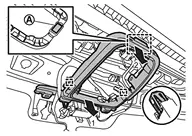
: Metal clip
INSTALLATION
Install in the reverse order of removal.
Was this page helpful?