Audio, Visual & Navigation System Audio with navigation
Antenna base
In this manual: Audio, Visual & Navigation System Audio with navigation
~1min read
Exploded View
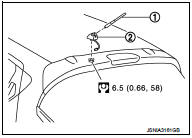
1. Antenna rod
Removal and Installation
If the antenna base mounting nut is tightened looser than the specified torque, then this will lower the sensitivity of the antenna. On the other hand, if the nut is tightened tighter than the specified torque, then this will deform the roof panel.
1. Antenna rod
2. Antenna base
 : N·m (kg-m, in-lb)
Removal and Installation
REMOVAL
1. Remove headlining. Refer to INT-26, "Exploded View". 2. Disconnect antenna feeder connector.3. Remove nut to remove antenna base.
INSTALLATION
Install in the reverse order of removal.
CAUTION:If the antenna base mounting nut is tightened looser than the specified torque, then this will lower the sensitivity of the antenna. On the other hand, if the nut is tightened tighter than the specified torque, then this will deform the roof panel.
Was this page helpful?