Audio, Visual & Navigation System Audio without navigation

Audio system symptoms

In this manual: Audio, Visual & Navigation System Audio without navigation
Foreword — 1General information — 45Engine Mechanical MR16DDT — 61Engine Mechanical HR16DE — 52Engine Mechanical K9K — 46Engine Lubrication System MR16DDT — 18Engine Lubrication System HR16DE — 14Engine Lubrication System K9K — 11Engine Cooling System MR16DDT — 28Engine Cooling System HR16DE — 29Engine Cooling System K9K — 24Engine Control System MR16DDT — 163Engine Control System HR16DE — 115Engine Control System K9K — 129Fuel System MR16DDT — 13Fuel system HR16DE — 11Fuel system K9K — 12Exhaust system MR16DDT — 7Exhaust system HR16DE — 10Exhaust system K9K — 7Starting system — 24Accelerator control system — 6Clutch — 25Driveline transfer: TY21B — 77Driveline rear propeller Shaft: 3Fφ16-ETJ75 — 12Driveline rear final drive: RTVS — 31Transaxle & transmission 5MT: RS5F92R — 31Transaxle & transmission 6MT: RS6F94R — 30Transaxle & transmission CVT: RE0F10B — 93Transaxle & transmissioN CVT: RE0F11A — 103Front Axle MR16DDT — 18Front Axle HR16DE — 17Front Axle K9K — 17Rear Axle 2WD — 6Rear Axle 4WD — 13Front Suspension — 21Rear Suspension 2WD — 13Rear Suspension 4WD — 17Road Wheels & Tires — 6Brake System LHD — 24Brake System RHD — 24Parking Brake System — 8Brake Control System without ESP — 44Brake Control System with ESP — 63Steering System — 14Steering Control System — 27Seat Belt — 8SRS Airbag — 24SRS Airbag Control System — 93Ventilation System — 11Heater & Air Conditioning System HR16DE — 28Heater & Air Conditioning System MR16DDT — 28Heater & Air Conditioning Control System Type 1 — 49Heater & Air Conditioning Control System Type 2 — 51Heater & Air Conditioning Control System Type 3 — 32Heater & Air Conditioning Control System Type 4 — 40Heater & Air Conditioning Control System Type 5 — 21Interior — 16Instrument Panel — 10Seat — 18Door & Lock Type 1 — 83Door & Lock type 2 — 80Door & Lock type 3 — 65Door & Lock type 4 — 60Security Control System with intelligent key system — 82Security Control System without intelligent key system — 41Glass & Window System — 15Power Window Control System — 28Body Repair — 13Exterior — 20Mirrors — 26Exterior Lighting System Halogen type — 51Interior Lighting System — 24Wiper & Washer — 45Defogger — 31Horn — 4Power Outlet — 4Body Control System With intelligent key system — 21Body Control System Without intelligent key system — 23LAN system can fundamental — 6LAN system can — 31LAN System can system (type 1) — 1LAN System can system (type 2) — 1LAN System can system (type 3) — 1LAN System can system (type 4) — 1LAN System can system (type 5) — 1LAN System can system (type 6) — 1LAN System can system (type 7) — 2LAN System can system (type 8) — 1LAN System can system (type 9) — 1LAN System can system (type 10) — 1LAN System can system (type 11) — 1Power Control System IPDM E/R (with I-key) — 14Power Control System IPDM E/R (without I-key) — 14Power Control System Power distribution system — 25Charging System — 22Power Supply, Ground & Circuit Elements — 20Meter, Warning Lamp & Indicator — 33Warning Chime System — 22Audio, Visual & Navigation System Audio without navigation — 30Audio, Visual & Navigation System Audio with navigation — 33Audio, Visual & Navigation System NISSAN dynamic control system — 22Cruise Control System — 1Drive Mode System — 10Maintenance — 14
~3min read

Models with USB connection function

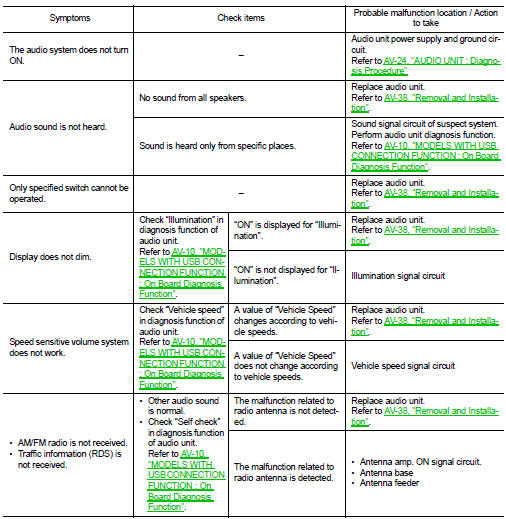
MODELS WITH USB CONNECTION FUNCTION : Symptom Table

AUDIO SYSTEM

RELATED TO HANDS-FREE PHONE

RELATED TO HANDS-FREE PHONE

• Check that the cellular phone is the corresponding type (Bluetooth™ enabled) and Bluetooth™ turns ON. • Malfunction may occur due to the version change of the phone type, etc. even though it is the corresponding type. The cell phone must support at least hands-free profile V1.0 and object push V1.0. Refer to cell phone instruction manual. • When customers contact concerning Bluetooth™ compatible cell phone malfunction for the first time, always suggest customers to update cellular phone software if possible. • Check that customer cellular phone is compatible on the published list. The dealer should contact its RBU/ NSC for the list. • Take note of any exceptions that the list may detail, i.e. no ringing tone or no phonebook transfer etc. If the customer phone is not listed then its full function cannot be guaranteed. NISSAN should not replace the audio unit if the cell phone does not appear on the list or the cell phone is operating as described on the list e.g. no ringing tone, no phonebook transfer etc.

• Take note of any exceptions to other phones made by the same manufacturer as the customers. Any exceptions on one model by a specific manufacturer may be common to all models made by that manufacturer.

Simple Check for Bluetooth™ Communication If cellular phone and audio unit cannot be connected with Bluetooth™ communication, following procedure allows the technician to judge which device has malfunction.

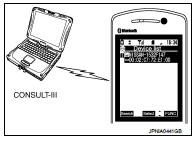
1. Turn on a cellular phone, not connecting Bluetooth™ communication. 2. Start CONSULT-III, then start Windows®. 3. Set CONSULT-III near a cellular phone.

4. When operated Bluetooth™ registration by cellular phone, check if CONSULT-III* would be displayed on the device name.

(If other Bluetooth™device is located near cellular phone, a name of the device would be displayed also.) NOTE

:
*:Displayed device name is “NISSAN- ”.


• If no device name is displayed, cellular phone is malfunction.

Repair the cellular phone first, then perform diagnosis.

• If CONSULT-III is displayed on device name, cellular phone is normal*.

Perform diagnosis as per the following table.

*: There is no 100% guarantee that cellular phone operates all functions on audio unit. Different phone manufacturers implement Bluetooth™ in different ways. Phones on Supported Phone List are tested and any minor exceptions are listed.
Trouble Diagnosis Chart by Sym
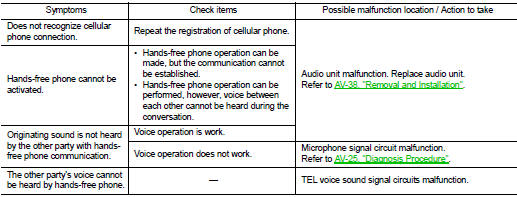
Trouble Diagnosis Chart by Sym

RELATED TO USB

RELATED TO USB

NOTE

:
Check that there is no malfunction of USB equipment main body before performing a diagnosis.

iPod® is a trademark of Apple inc., registered in the U.S. and other

iPod® is a trademark of Apple inc., registered in the U.S. and other countries.

RELATED TO AUXILIARY INPUT

NOTE

:
Check that there is no malfunction of AUX equipment main body before performing a diagnosis.

RELATED TO STEERING SWITCH
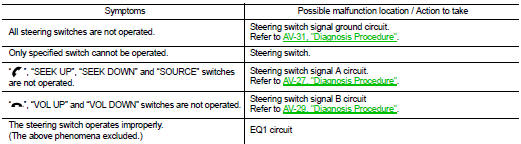
RELATED TO STEERING SWITCH

Models without USB connection function

Models without USB connection function

MODELS WITHOUT USB CONNECTION FUNCTION : Symptom Table

Normal operating condition