Instruments and controls
Clock (if so equipped)
In this manual: Instruments and controls
~1min read
The digital clock (in the audio unit) displays time when the ignition switch is in the ACC or ON position. The clock ON or OFF mode can be selected. For details of the digital clock in the NAVIGATION SYSTEM, refer to “Clock” .
If the power supply is disconnected, the clock will not indicate the correct time.
Readjust the time.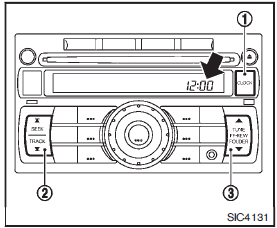
ADJUSTING THE TIME
Push the CLOCK button1 to turn the clock on or off.
1. Push and hold the CLOCK button 1 until the clock display starts to flash. 2. Push the SEEK/TRACK button2 to adjust the hours. 3. Push the TUNE/FF·REW button 3 to adjust the minutes.4. Push the CLOCK button 1 again to exit the clock set mode.
The display will return to the regular clock display after 5 seconds.
Was this page helpful?