Body Control System Without intelligent key system

Configuration (bcm)

In this manual: Body Control System Without intelligent key system
Foreword — 1General information — 45Engine Mechanical MR16DDT — 61Engine Mechanical HR16DE — 52Engine Mechanical K9K — 46Engine Lubrication System MR16DDT — 18Engine Lubrication System HR16DE — 14Engine Lubrication System K9K — 11Engine Cooling System MR16DDT — 28Engine Cooling System HR16DE — 29Engine Cooling System K9K — 24Engine Control System MR16DDT — 163Engine Control System HR16DE — 115Engine Control System K9K — 129Fuel System MR16DDT — 13Fuel system HR16DE — 11Fuel system K9K — 12Exhaust system MR16DDT — 7Exhaust system HR16DE — 10Exhaust system K9K — 7Starting system — 24Accelerator control system — 6Clutch — 25Driveline transfer: TY21B — 77Driveline rear propeller Shaft: 3Fφ16-ETJ75 — 12Driveline rear final drive: RTVS — 31Transaxle & transmission 5MT: RS5F92R — 31Transaxle & transmission 6MT: RS6F94R — 30Transaxle & transmission CVT: RE0F10B — 93Transaxle & transmissioN CVT: RE0F11A — 103Front Axle MR16DDT — 18Front Axle HR16DE — 17Front Axle K9K — 17Rear Axle 2WD — 6Rear Axle 4WD — 13Front Suspension — 21Rear Suspension 2WD — 13Rear Suspension 4WD — 17Road Wheels & Tires — 6Brake System LHD — 24Brake System RHD — 24Parking Brake System — 8Brake Control System without ESP — 44Brake Control System with ESP — 63Steering System — 14Steering Control System — 27Seat Belt — 8SRS Airbag — 24SRS Airbag Control System — 93Ventilation System — 11Heater & Air Conditioning System HR16DE — 28Heater & Air Conditioning System MR16DDT — 28Heater & Air Conditioning Control System Type 1 — 49Heater & Air Conditioning Control System Type 2 — 51Heater & Air Conditioning Control System Type 3 — 32Heater & Air Conditioning Control System Type 4 — 40Heater & Air Conditioning Control System Type 5 — 21Interior — 16Instrument Panel — 10Seat — 18Door & Lock Type 1 — 83Door & Lock type 2 — 80Door & Lock type 3 — 65Door & Lock type 4 — 60Security Control System with intelligent key system — 82Security Control System without intelligent key system — 41Glass & Window System — 15Power Window Control System — 28Body Repair — 13Exterior — 20Mirrors — 26Exterior Lighting System Halogen type — 51Interior Lighting System — 24Wiper & Washer — 45Defogger — 31Horn — 4Power Outlet — 4Body Control System With intelligent key system — 21Body Control System Without intelligent key system — 23LAN system can fundamental — 6LAN system can — 31LAN System can system (type 1) — 1LAN System can system (type 2) — 1LAN System can system (type 3) — 1LAN System can system (type 4) — 1LAN System can system (type 5) — 1LAN System can system (type 6) — 1LAN System can system (type 7) — 2LAN System can system (type 8) — 1LAN System can system (type 9) — 1LAN System can system (type 10) — 1LAN System can system (type 11) — 1Power Control System IPDM E/R (with I-key) — 14Power Control System IPDM E/R (without I-key) — 14Power Control System Power distribution system — 25Charging System — 22Power Supply, Ground & Circuit Elements — 20Meter, Warning Lamp & Indicator — 33Warning Chime System — 22Audio, Visual & Navigation System Audio without navigation — 30Audio, Visual & Navigation System Audio with navigation — 33Audio, Visual & Navigation System NISSAN dynamic control system — 22Cruise Control System — 1Drive Mode System — 10Maintenance — 14
~2min read

Description

Vehicle specification needs to be written with CONSULT-III because it is not written after replacing BCM.

Configuration has three functions as follows.

NOTE

:
Manual setting item: Items which need selection by vehicle specifications Automatic setting item: Items which are written in automatically (Setting can not be changed)

CAUTION:
• When replacing BCM, you must perform “WRITE CONFIGURATION” with CONSULT-III. • Complete the procedure of “WRITE CONFIGURATION” in order. • If you set incorrect “WRITE CONFIGURATION”, incidents might occur. • Configuration is different for each vehicle model. Confirm configuration of each vehicle model. • Never perform “WRITE CONFIGURATION” when performing operations other than the below.

- Replacing with new BCM - Changing “SECURITY ALARM SET(SIREN)” of work support from ON to OFF*

NOTE:

*: Perform configuration in “WRITE CONFIGURATION - Manual selection” after performing this work support.

Work Procedure

1.WRITING MODE SELECTION

Select “CONFIGURATION” of BCM.CONSULT-III Configuration


Select “CONFIGURATION” of BCM.

When writing saved data>>GO TO 2.

When writing manually>>GO TO 3.

2.PERFORM “WRITE CONFIGURATION - CONFIG FILE”

Perform “WRITE CONFIGURATION - Config file”.CONSULT-III Configuration


Perform “WRITE CONFIGURATION - Config file”.

>> WORK END

3.PERFORM “WRITE CONFIGURATION - MANUAL SELECTION”

1. Select "WRITE CONFIGURATION - Manual selection".CONSULT-III Configuration


1. Select "WRITE CONFIGURATION - Manual selection". 2. Identify the correct model and configuration list. Refer to BCS-152, "Configuration list".

3. Confirm and/or change setting value for each item.

CAUTION:
Thoroughly read and understand the vehicle specification. Incorrect settings may result in abnormal control of ECU.

4. Select "SETTING".

CAUTION:
Make sure to select “SETTING” even if the indicated configuration of brand new BCM is same as the desirable configuration. If not, configuration which is set automatically by selecting vehicle model can not be memorized.

5. When "COMMAND FINISHED", select "END".

>> GO TO 4.

4.OPERATION CHECK

Confirm that each function controlled by BCM operates normally.

>> WORK END

Configuration list

CAUTION:
Thoroughly read and understand the vehicle specification. Incorrect settings may result in abnormal control of ECU.

2WD MODELS
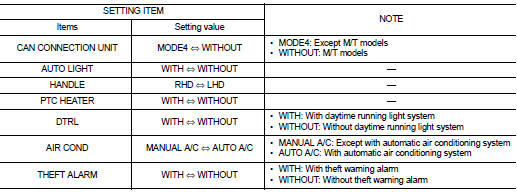
⇔: Items which confirm vehicle specifications

⇔: Items which confirm vehicle specifications 4WD MODELS

⇔: Items which confirm vehicle specifications

⇔: Items which confirm vehicle specifications