Security Control System without intelligent key system

Diagnosis and repair work flow

In this manual: Security Control System without intelligent key system
Foreword — 1General information — 45Engine Mechanical MR16DDT — 61Engine Mechanical HR16DE — 52Engine Mechanical K9K — 46Engine Lubrication System MR16DDT — 18Engine Lubrication System HR16DE — 14Engine Lubrication System K9K — 11Engine Cooling System MR16DDT — 28Engine Cooling System HR16DE — 29Engine Cooling System K9K — 24Engine Control System MR16DDT — 163Engine Control System HR16DE — 115Engine Control System K9K — 129Fuel System MR16DDT — 13Fuel system HR16DE — 11Fuel system K9K — 12Exhaust system MR16DDT — 7Exhaust system HR16DE — 10Exhaust system K9K — 7Starting system — 24Accelerator control system — 6Clutch — 25Driveline transfer: TY21B — 77Driveline rear propeller Shaft: 3Fφ16-ETJ75 — 12Driveline rear final drive: RTVS — 31Transaxle & transmission 5MT: RS5F92R — 31Transaxle & transmission 6MT: RS6F94R — 30Transaxle & transmission CVT: RE0F10B — 93Transaxle & transmissioN CVT: RE0F11A — 103Front Axle MR16DDT — 18Front Axle HR16DE — 17Front Axle K9K — 17Rear Axle 2WD — 6Rear Axle 4WD — 13Front Suspension — 21Rear Suspension 2WD — 13Rear Suspension 4WD — 17Road Wheels & Tires — 6Brake System LHD — 24Brake System RHD — 24Parking Brake System — 8Brake Control System without ESP — 44Brake Control System with ESP — 63Steering System — 14Steering Control System — 27Seat Belt — 8SRS Airbag — 24SRS Airbag Control System — 93Ventilation System — 11Heater & Air Conditioning System HR16DE — 28Heater & Air Conditioning System MR16DDT — 28Heater & Air Conditioning Control System Type 1 — 49Heater & Air Conditioning Control System Type 2 — 51Heater & Air Conditioning Control System Type 3 — 32Heater & Air Conditioning Control System Type 4 — 40Heater & Air Conditioning Control System Type 5 — 21Interior — 16Instrument Panel — 10Seat — 18Door & Lock Type 1 — 83Door & Lock type 2 — 80Door & Lock type 3 — 65Door & Lock type 4 — 60Security Control System with intelligent key system — 82Security Control System without intelligent key system — 41Glass & Window System — 15Power Window Control System — 28Body Repair — 13Exterior — 20Mirrors — 26Exterior Lighting System Halogen type — 51Interior Lighting System — 24Wiper & Washer — 45Defogger — 31Horn — 4Power Outlet — 4Body Control System With intelligent key system — 21Body Control System Without intelligent key system — 23LAN system can fundamental — 6LAN system can — 31LAN System can system (type 1) — 1LAN System can system (type 2) — 1LAN System can system (type 3) — 1LAN System can system (type 4) — 1LAN System can system (type 5) — 1LAN System can system (type 6) — 1LAN System can system (type 7) — 2LAN System can system (type 8) — 1LAN System can system (type 9) — 1LAN System can system (type 10) — 1LAN System can system (type 11) — 1Power Control System IPDM E/R (with I-key) — 14Power Control System IPDM E/R (without I-key) — 14Power Control System Power distribution system — 25Charging System — 22Power Supply, Ground & Circuit Elements — 20Meter, Warning Lamp & Indicator — 33Warning Chime System — 22Audio, Visual & Navigation System Audio without navigation — 30Audio, Visual & Navigation System Audio with navigation — 33Audio, Visual & Navigation System NISSAN dynamic control system — 22Cruise Control System — 1Drive Mode System — 10Maintenance — 14
~2min read

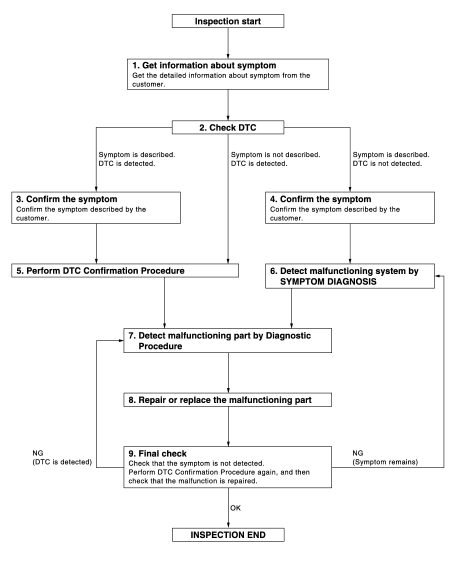
Work Flow

OVERALL SEQUENCE

DETAILED FLOW

DETAILED FLOW

1.GET INFORMATION ABOUT SYMPTOM

Get the detailed information from the customer about the symptom (the condition and the environment when the incident/malfunction occurred).

>> GO TO 2.

2.CHECK DTC 1. Check DTC for “ENGINE” and “BCM” using CONSULT-III. 2. Perform the following procedure if DTC is displayed. - Erase DTC. - Study the relationship between the cause detected by DTC and the symptom described by the customer.

3. Check related service bulletins for information.

Is any symptom described and any DTC detected? Symptom is described, DTC is displayed>>GO TO 3. Symptom is described, DTC is not displayed>>GO TO 4.

Symptom is not described, DTC is displayed>>GO TO 5.

3.CONFIRM THE SYMPTOM

Confirm the symptom described by the customer.

Connect CONSULT-III to the vehicle and check self diagnosis results in real time.

Verify relation between the symptom and the condition when the symptom is detected.

>> GO TO 5.

4.CONFIRM THE SYMPTOM

Confirm the symptom described by the customer.

Connect CONSULT-III to the vehicle and check self diagnosis results in real time.

Verify relation between the symptom and the condition when the symptom is detected.

>> GO TO 6.

5.PERFORM DTC CONFIRMATION PROCEDURE

Perform DTC CONFIRMATION PROCEDURE for the displayed DTC, and then check that DTC is detected again.

If two or more DTCs are detected, refer to BCS-140, "DTC Inspection Priority Chart" (BCM) and then determine the trouble diagnosis order.

Is DTC detected? YES >> GO TO 7.

NO >> Refer to GI-42, "Intermittent Incident".

6.DETECT MALFUNCTIONING SYSTEM BY SYMPTOM DIAGNOSIS

Detect malfunctioning system according to SYMPTOM DIAGNOSIS based on the confirmed symptom in step 4, and determine the trouble diagnosis order based on possible causes and symptom.

>> GO TO 7.

7.DETECT MALFUNCTIONING PART BY DIAGNOSTIC PROCEDURE

Inspect according to Diagnostic Procedure of the system.

>> GO TO 8.

8.REPAIR OR REPLACE THE MALFUNCTIONING PART 1. Repair or replace the malfunctioning part. 2. Reconnect parts or connectors disconnected during Diagnostic Procedure again after repair and replacement.

3. Check DTC. If DTC is displayed, erase it.

>> GO TO 9.

9.FINAL CHECK

When DTC was detected in step 2, perform DTC CONFIRMATION PROCEDURE again, and then check that the malfunctions have been fully repaired.

When symptom was described by the customer, refer to the confirmed symptom in step 3 or 4, and check that the symptom is not detected.

Does the symptom reappear? YES (DTC is detected)>>GO TO 7.

YES (Symptom remains)>>GO TO 6.

NO >> INSPECTION END