How to use remote keyless entry function
• The Intelligent Key transmits radio waves when the buttons are pushed. The FAA advises that the radio waves may affect aircraft navigation and communication systems.
Do not operate the Intelligent Key while on an airplane.
Make sure the buttons are not operated unintentionally when the unit is stored during a flight.
CAUTION • Do not allow the Intelligent Key, which contains electrical components, to come into contact with water or salt water. This could affect the system function. • Do not drop the Intelligent Key. • Do not strike the Intelligent Key sharply against another object. • Do not change or modify the Intelligent Key. • Wetting may damage the Intelligent Key. If the Intelligent Key gets wet, immediately wipe until it is completely dry. • If the outside temperature is below 148F (-108C) degrees, the battery of the intelligent key may not function properly. • Do not place the Intelligent Key for an extended period in an area where temperatures exceed 1408F (608C). • Do not attach the Intelligent Key with a key holder that contains a magnet.• Do not place the Intelligent Key near equipment that produces a magnetic field, such as a TV, audio equipment, personal computers or cellular phone.
The remote keyless entry function can operate all door locks using the remote keyless entry function of the Intelligent Key. The remote keyless entry function can operate at a distance of approximately 33 ft (10 m) from the vehicle.
(The operating distance depends upon the conditions around the vehicle.) The remote keyless entry function will not operate:
• When the Intelligent Key is not within the operational range. • When the doors are open or not closed securely.• When the Intelligent Key battery is discharged.
The remote keyless entry function can also operate the vehicle alarm.
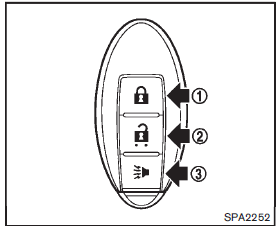
1 LOCK  button
2 UNLOCK  button
3 PANIC  button
When you lock or unlock the doors, the hazard indicator will flash and the horn will sound as a confirmation. For details, see “Setting hazard indicator and horn mode” .
Locking doors
1. Place the ignition switch in the OFF position and carry the Intelligent Key with you. 2. Carry the Intelligent Key with you. 3. Close all the doors. 4. Push the LOCK button 1 on the Intelligent Key. 5. All the doors and the lift gate will lock.
6. The hazard indicator flashes twice and the horn chirps once.
: Doors will lock with the Intelligent Key while the ignition switch is in the ACC or ON position.
Operate the door handles to confirm that the doors have been securely locked.
Unlocking doors
1. Push the UNLOCK button 2 on the Intelligent Key once. 2. The hazard indicator flashes once. The driver’s door will unlock. 3. Push the UNLOCK
button again within 1 minute.
4. The hazard indicator flashes once. All the doors and the lift gate will unlock.
All doors will be locked automatically unless one of the following operations is performed within 1 minute after pushing the UNLOCK button while the doors are locked.
• Opening any door (including the lift gate).
• Pushing the ignition switch.
During this 1-minute time period, if the UNLOCK button is pushed, all doors will be
locked automatically after another 1 minute.
Using panic alarm
If you are near your vehicle and feel threatened, you may activate the alarm to call attention as follows: 1. Push the PANIC button 3 on the Intelligent Key for more than 1 second. 2. The theft warning alarm and headlights will stay on for 25 seconds.
3. The panic alarm stops when:
• It has run for 25 seconds, or • Any of the buttons on the Intelligent Key is pushed. (Note: the PANIC button must be pushed for more than 1 second.)
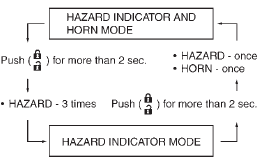
Setting hazard indicator and horn mode
This vehicle is set in hazard indicator and horn mode when you first receive the vehicle.
In hazard indicator and horn mode, when the LOCK button 1 is pushed, the hazard indicator
flashes twice and the horn chirps once.
When the UNLOCK button2 is pushed,
the hazard indicator flashes once.
If horns are not necessary, the system can be switched to the hazard indicator mode.
In hazard indicator mode, when the LOCK button is pushed, the hazard indicator
flashes twice. When the UNLOCK button
is pushed, neither the hazard indicator nor the horn operates.

Hazard indicator mode:

Switching procedure:
To switch the hazard indicator and horn (chime) operation, push the LOCK 1 and UNLOCK 2 buttons on the Intelligent Key simultaneously
for more than 2 seconds.
• When the hazard indicator and horn mode is set, the hazard indicator flashes once and the horn chirps once.