Speed limiter
SWITCHES AND INDICATORS
NOTE:
Shared with ASCD switch.
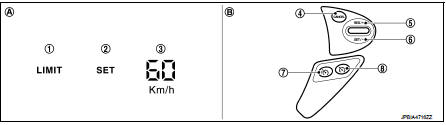
1. Speed limiter indicator 2. SET indicator
3. Set speed indicator
4. CANCEL switch
5. RES / + switch
6. SET / − switch
7. Speed limiter MAIN Switch 8. ASCD MAIN switch
A. On the combination meter (Information display)
B. On the steering wheel
SET SPEED RANGE
Speed limiter system can be set the following vehicle speed.

SWITCH OPERATION
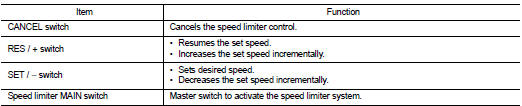
SET OPERATION
• Press speed limiter MAIN switch. (LIMIT indicated on the information display)• By pressing the SET/− switch, the vehicle speed can be set within the range between 30 km/h and 210 km/h or 20 mph and 130 mph. (SET and set speed is indicated on the information display) • When pressing the RES/+ switch, the set speed can be increased.
• When pressing the SET/− switch, the set speed can be decreased.
CANCEL CONDITION
• When any of following conditions exist, speed limiter control is canceled.- Speed limiter MAIN switch is pressed. (Set speed is cleared.) - ASCD MAIN switch is pressed. (Set speed is cleared.) - CANCEL switch is pressed.
• When accelerator pedal is fully depressed (Kickdown), speed limiter control is temporarily released. And driver can be driven above set speed (Set speed indicator is blinked). • When the ECM detects any of the following conditions, the ECM cancels the speed limiter operation and informs the driver by blinking speed limiter indicator and SET indicator.- Malfunction for some self-diagnosis regarding ASCD system.
RESUME OPERATION
After the speed limiter is released by other method than the MAIN switch, the RES/+ switch allows to set the vehicle speed again to the one that is previously set before releasing the speed limiter.