How to use the NISSAN controller
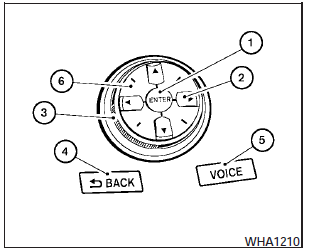
Use the NISSAN controller to choose an item on the display screen. Highlight an item on the display using the main directional buttons (2)- (certain Navigation System functions use the additional directional buttons (6)- ) or the center dial (3). Then press the ENTER button (1) to select the item or perform the action.
The BACK button (4)- has two functions:
- Go back to the previous display (cancel).
If you press the BACK button (4)- during setup, the setup will be canceled and/or the display will return to the previous screen.
- Finish setup.
In some screens, pressing the BACK button (4)- accepts the changes made during setup.
For the VOICE button (5)- functions, refer to the separate Navigation System Owners Manual.
Test yourself
A quick Nissan Maxima quiz: every answer comes with an explanation and a link to the manual page.