High Beam Assist (if so equipped)
The High Beam Assist system will operate when the vehicle is driven at speeds of approximately 40 km/h and above. If an oncoming vehicle or leading vehicle appears in front of your vehicle when the headlight high beam is on, the headlight will be switched to the low beamautomatically.
- The High BeamAssist system is a convenience but it is not a substitute for safe driving operation. The driver should remain alert at all times, ensure safe driving practices and switch the high beams and low beam manually when necessary.
- The high beam or low beam may not switch automatically under the following conditions. Switch the high beam and low beammanually.
- During bad weather (rain, fog, snow, wind, etc.).
- When a light source similar to a headlight or tail light is in the vicinity of the vehicle.
- When the headlights of the oncoming vehicle or the leading vehicle are turned off, when the color of the light is affected due to foreign materials on the lights, or when the light beam is out of position.
- When there is a sudden, continuous change in brightness.
- When driving on a road that passes over rolling hills, or a road that has level differences.
- When driving on a road with many curves.
- When a sign or mirror-like surface is reflecting intense light towards the front of the vehicle.
- When the container, etc. being towed by a leading vehicle is reflecting intense light.
- When a headlight on your vehicle is damaged or dirty.
- When the vehicle is leaning at an angle due to a punctured tire, being towed, etc.
- The timing of switching the low beam and high beammaychange under the following situations.
- The brightness of the headlights of the oncoming vehicle or leading vehicle.
- The movement and direction of the oncomingvehicleandthe leading vehicle.
- When only one light on the oncoming vehicle or the leading vehicle is illuminated.
- When the oncoming vehicle or the leading vehicle is a two-wheeled vehicle.
- Road conditions (incline, curve, the road surface, etc.).
- The number of passengers and the amount of luggage.
High Beam Assist operation
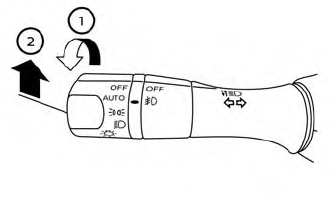
To activate the High Beam Assist system, turn the headlight switch to the AUTO position  and push the lever forward
 (high beam position). The
 High Beam Assist indicator light in the meter will illuminate while the headlights are turned on. If the High Beam Assist indicator light does not illuminate in the above condition, itmay indicate that the system is not functioning properly. Have the system checked, it is recommended that you visit a NISSAN dealer for this service.
When the vehicle speed lowers to less than approximately 25 km/h, the headlight uses the low beam.
To turn off the High Beam Assist system, turn the headlight switch to the  position or select the low beam position by placing the lever in the neutral position.
Ambient image sensor maintenance
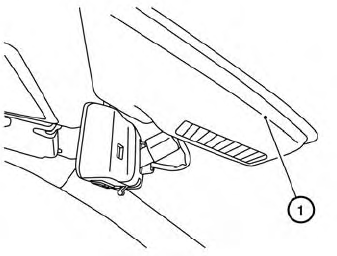
The ambient image sensor  for the High Beam Assist system is located in front of the inside mirror. To maintain the proper operation of the high beam assist system and prevent a system malfunction, be sure to observe the following:
- Always keep the windshield clean.
- Do not attach a sticker (including transparent material) or install an accessory near the ambient image sensor.
- Do not strike or damage the areas around the ambient image sensor. Do not touch the sensor lens that is located on the ambient image sensor.
If the ambient image sensor is damaged due to an accident, it is recommended that you visit a NISSAN dealer.