How to use the vehicle information display
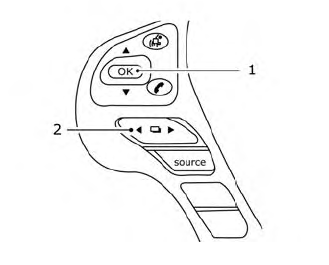
The vehicle information display can be changed using the OK and  buttons located on the steering wheel.
- OK — change or select an item in the vehicle information display.
 — scroll up or down the vehicle information menu items. If the vehicle information display is not showing a menu with the
 buttons, pressing the
 will change to the previous/next audio preset.
 — go back or forward through the vehicle information menu items or to change fromone display screen to the next (i.e. trip, TPMS, fuel economy).
The OK and  buttons also control audio and control panel functions in some conditions. Most screens and menus offer instruction prompts of the steering switch buttons to indicatehowto control the vehicle information display. An orange cursor is shown to indicate where you are in the available menu items. A scroll bar with up and down arrows will appear if there is more than one page of menu items. For additional information, refer to the separate NissanConnect® Owner’s Manual.