Pre-driving checks and adjustments
Locking with key
In this manual: Pre-driving checks and adjustments
~1min read

To lock or unlock the vehicle, turn the key as shown.
Manual
To lock a door, turn the key toward the front of the vehicle  . To unlock a door, turn the key toward the rear
 .
Power (if so equipped)
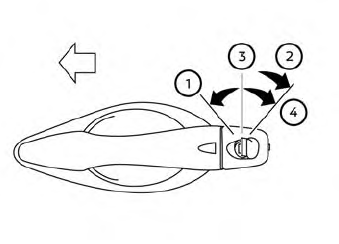
The power door lock system allows you to lock or unlock all doors at the same time.
Turning the key toward the front  of the vehicle locks all doors.
Turning the key one time toward the rear  of the vehicle unlocks that door. From that position, returning the key to neutral
 (where the key can only be removed and inserted) and turning it toward the rear again within 5 seconds unlocks all doors
 .
Opening and closing windows (if so equipped)
The driver’s door key operation allows you to open and close windows equipped with automatic operation at the same time.
- To open the windows, turn the driver’s door key toward the rear of the vehicle for longer than 1 second.
- To close the windows, turn the driver’s door key toward the front of the vehicle for longer than 1 second.
Windows stop when the key cylinder is released.
Was this page helpful?