In this manual: Ventilation, Heater & Air Conditioner
~5min read
Switch Name and Function
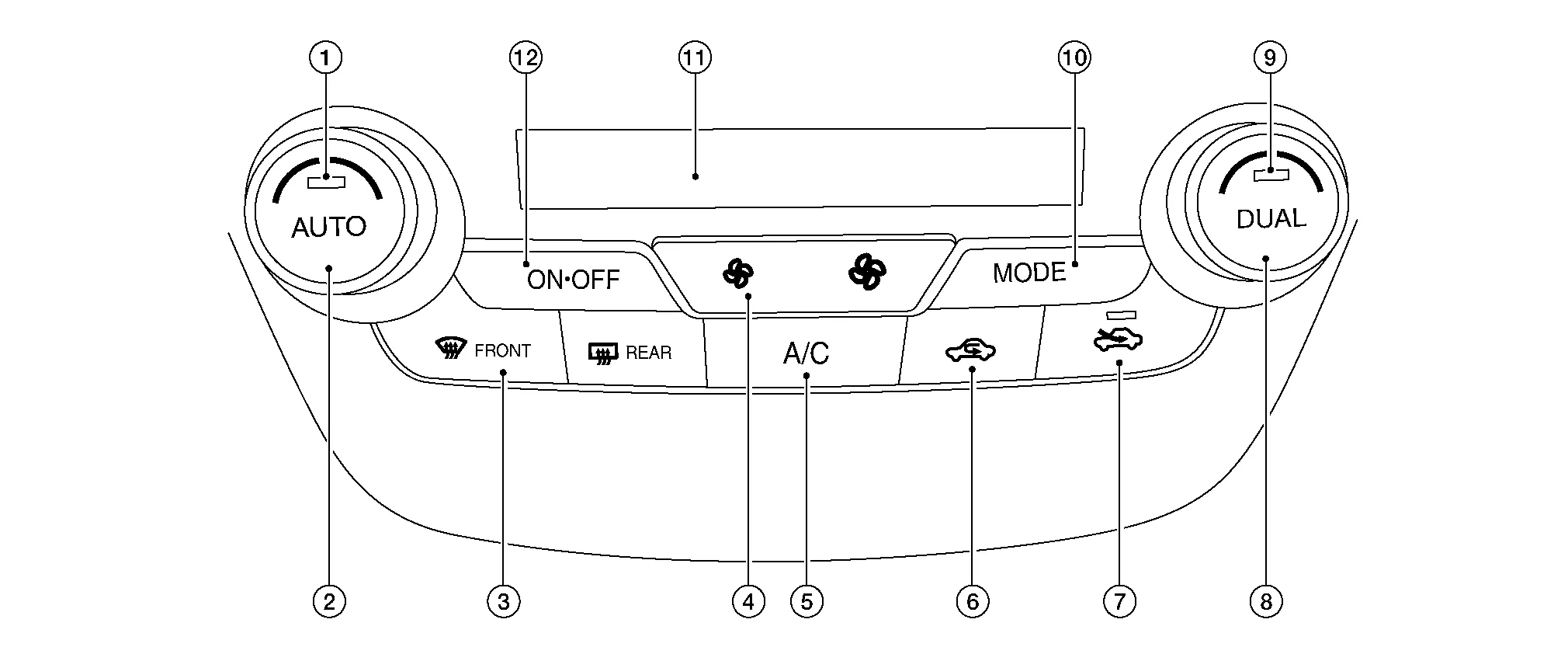
Controller (A/C switch assembly)
1.
AUTO switch
2.
Temperature control dial (driver side)
3.
Defroster switch
4.
Fan switch
5.
A/C switch
6.
Recirculation switch
7.
Fresh air switch
8.
Temperature control dial (passenger side)
9.
DUAL switch
10.
MODE switch
11.
Display
12.
ON·OFF switch
Switch Operation
AUTO switch
Turns the switch indicator lamp and “AUTO” indicator on the display ON and then front air conditioning system becomes the following state:
Air inlet: Automatic control
Air outlet: Automatic control
Blower fan: Automatic control
A/C compressor: ON
Defroster switch
Turns defroster mode (switch indicator) between ON ⇔ OFF each time.
When defroster switch is pressed while front air conditioning system is in the ON position.
When defroster mode is turned ON, front air conditioning system becomes the following state:
Air inlet: Fresh air intake
Air outlet: DEF
Blower fan: Automatic control (If fan speed other than AUTO is selected before pressing defroster switch, fan speed is manual control.)
A/C compressor: ON
When defroster mode is turned OFF, front air conditioning system state returns to the previous state before defroster mode is selected. But, the following state is continued:
Air inlet: Fresh air intake
A/C compressor: ON
When defroster switch is pressed while front air conditioning system is in the OFF position.
When defroster mode is turned ON, front air conditioning system becomes the following state:
Air inlet: Fresh air intake
Air outlet: Defroster
Blower fan: Automatic control
Compressor: ON
When defroster mode is turned OFF, entire front air conditioning system is set to auto mode.
DUAL switch
Turns left and right ventilation temperature control (switch indicator) between ON ⇔ OFF each time.
When DUAL switch indicator is ON, the driver side and passenger side temperatures can each be set independently.
When DUAL switch indicator is OFF, the driver side outlet and setting temperature is applied to both sides.
Left and right ventilation temperature control is cancelled by turning the DEF mode ON.
Fan switch (UP/DOWN)
Blower fan speed is manually controlled with these switches. Seven speeds are available for manual control (as shown on the display screen).
A/C switch
Compressor control (switch indicator) changes between ON ⇔ OFF each time this switch is pressed while front blower motor is operated.
MODE switch
Selects air outlet sequentially from VENT ⇒ B/L ⇒ FOOT ⇒ D/F ⇒ VENT each time.
ON·OFF switch
Turns front air conditioning system ON·OFF.
When front air conditioning system turns OFF:
air outlet becomes automatic control.
air inlet is set to recirculation.
Fresh air switch
Air inlet changes to fresh air (FRE) when this switch is pressed:
Fresh air switch indicator ON: Fresh air intake
Fresh air switch indicator OFF: Recirculation
Recirculation switch
Air inlet changes to recirculation (REC) when this switch is pressed:
Recirculation switch indicator ON: Recirculation
Recirculation switch indicator OFF: Fresh air intake
Temperature control dial (Driver side)
Setting temperature is selected using this dial within a range between 60°F or 61°F (18°C) and 89°F or 90°F (32°C) at a rate of 1.0°F (0.5°C) per adjustment.
Temperature control dial (Passenger side)
Outlet air flow temperature of passenger side can be changed without changing outlet air flow temperature of driver side.
Setting temperature is selected using this dial within a range between 60°F or 61°F (18°C) and 89°F or 90°F (32°C) at a rate of 1.0°F (0.5°C) per adjustment.