Pre-driving checks and adjustments
Unlocking doors
In this manual: Pre-driving checks and adjustments
4steps
~24min
2/5difficulty
Done 0 of 4
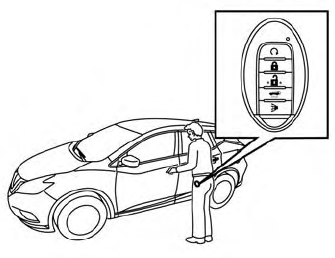
- Carry the Intelligent Key.
- Push the door handle request switch or power liftgate request switch.
- The hazard indicator lights flash once and the outside chime sounds once.
- Push the door handle request switch again within 1 minute to unlock all doors.

If a door handle is pulled while unlocking the doors, that door may not be unlocked. Returning the door handle to its original position will unlock the door. If the door does not unlock after returning the door handle, push the door handle request switch to unlock the door.
All doors will be locked automatically unless one of the following operations is performed within 1 minute after pushing the request switch.
- Opening any door.
- Pushing the ignition switch.
The interior light timer illuminates for a period of time when a door is unlocked and the room light switch is in the DOOR position.
The interior light can be turned off without waiting by performing one of the following operations:
- Placing the ignition switch in theONposition.
- Locking the doors with the remote control.
- Switching the room light switch to the OFF position.
- Switching the Auto Room Lamp to the OFF position in “Vehicle Settings” of the vehicle information display. For additional information, refer to “Vehicle information display” in the “Instruments and controls” section of this manual.
Was this page helpful?