Pre-driving checks and adjustments
Loose fuel cap warning
In this manual: Pre-driving checks and adjustments
~1min read
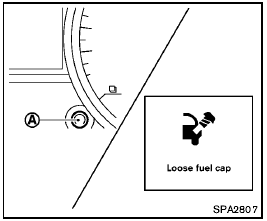
Loose fuel cap warning
The LOOSE FUEL CAP warning appears on the vehicle information display when the fuel-filler cap is not tightened correctly after the vehicle has been refueled. It may take a few driving trips for the message to be displayed. To turn off the warning, perform the following steps:
1. Remove and install the fuel-filler cap as soon as possible. (See “FUEL-FILLER CAP”.) 2. Tighten the fuel-filler cap until it clicks.
3. Push the  switch A for about 1 second to turn off the LOOSE FUEL CAP warning after tightening the fuel cap.
Test yourself
A quick Nissan Rogue quiz: every answer comes with an explanation and a link to the manual page.
Was this page helpful?