Center display, heater, air conditioner, audio, phone and voice recognition systems
How to switch the display
In this manual: Center display, heater, air conditioner, audio, phone and voice recognition systems
~1min read
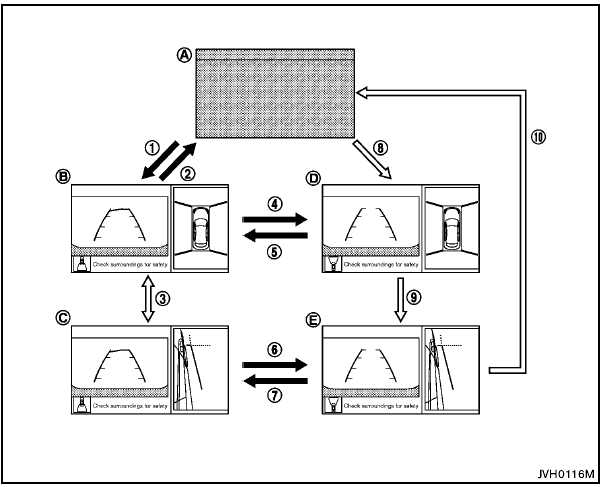
 : Shift the selector/shift lever
 : Push the CAMERA button
A : Original screen before the Around View Monitor is operated
B : Rear view/bird-eye view screen
C : Rear view/front-side view screen
D : Front view/bird-eye view screen
E : Front view/front-side view screen
The Around View Monitor display consists of the left and the right screens. You can see a combination of different views on the screens as illustrated.
Test yourself
A quick Nissan Rogue quiz: every answer comes with an explanation and a link to the manual page.
Was this page helpful?