Compact Disc (CD) player
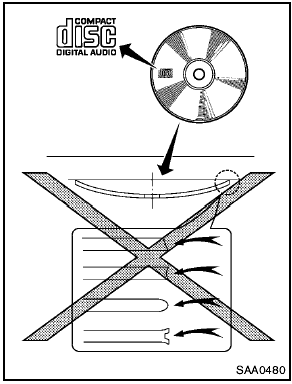
- Do not force a compact disc into the CD insert slot. This could damage the CD and/ or CD player.
- During cold weather or rainy days, the player may malfunction due to the humidity. If this occurs, remove the CD and dehumidify or ventilate the player completely.
- The player may skip while driving on rough roads.
- The CD player sometimes cannot function when the passenger compartment temperature is extremely high. Decrease the temperature before use.
- Only use high quality 4.7 in (12 cm) round discs that have the “COMPACT disc DIGITAL AUDIO” logo on the disc or packaging.
- Do not expose the CD to direct sunlight.
- CDs that are of poor quality, dirty, scratched, covered with fingerprints, or that have pin holes may not work properly.
- The following CDs may not work properly:
— Copy control compact discs (CCCD) — Recordable compact discs (CD-R) — Rewritable compact discs (CD-RW) - Do not use the following CDs as they may cause the CD player to malfunction.
— 3.1 in (8 cm) discs
— CDs that are not round
— CDs with a paper label
— CDs that are warped, scratched, or have abnormal edges
- This audio system can only play prerecorded CDs. It has no capabilities to record or burn CDs.
- If the CD cannot be played, one of the following messages will be displayed.
CHECK DISC:
— Confirm that the CD is inserted correctly (the label side is facing up, etc.).
— Confirm that the CD is not bent or warped and it is free of scratches.
PUSH EJECT:
This is an error due to the temperature inside the player is too high. Remove the CD by pushing the EJECT button, and after a short time reinsert the CD. The CD can be played when the temperature of the player returns to normal.
UNPLAYABLE:
The file is unplayable in this audio system (only MP3 or WMA CD).
Test yourself
A quick Nissan Rogue quiz: every answer comes with an explanation and a link to the manual page.