Center display, heater, air conditioner, audio, phone and voice recognition systems
Control buttons
In this manual: Center display, heater, air conditioner, audio, phone and voice recognition systems
~1min read
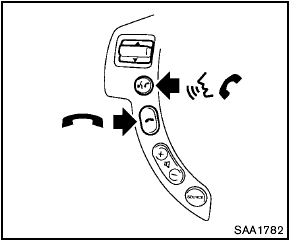
Control buttons
The control buttons for the Bluetooth® Hands- Free Phone System are located on the steering wheel.
 PHONE SEND
Push the button to initiate a VR session or answer an incoming call.
You can also use the button to interrupt system feedback and give a command at once.
 PHONE END
While the voice recognition system is active, push the button to go back one step. Push and hold the button for 5 seconds to quit the voice recognition system at any time.
Test yourself
A quick Nissan Rogue quiz: every answer comes with an explanation and a link to the manual page.
Was this page helpful?