Display screen, heater, air conditioner, audio and phone systems
Adjusting the screen (models with Navigation System)
In this manual: Display screen, heater, air conditioner, audio and phone systems
~1min read
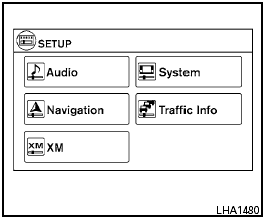
Adjusting the screen (models with Navigation System)
To adjust the quality of the screen, perform the following.
1. Press the SETUP button.
2. Touch “System”.
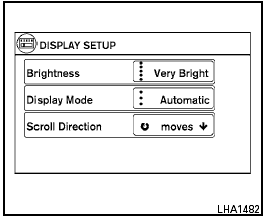
3. Touch “Display”.
4. To adjust the brightness, touch the “Brightness” key repeatedly to set the display to Very Bright, Bright, Default, Dark or Very Dark. Touch “Display Mode” to cycle between day, night and automatic display modes.
Do not adjust the screen settings of the RearView Monitor while the vehicle is moving.
Test yourself
A quick Nissan Sentra quiz: every answer comes with an explanation and a link to the manual page.
Was this page helpful?