Connecting iPod
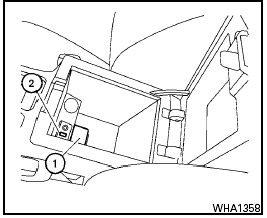
To connect an iPod to the vehicle so that the iPod can be controlled with the audio system controls and display screen, use the USB jack located in the center console. Open the protective cover 1 on the USB jack in the center console. Then connect the iPod -specific end of the cable to the iPod and the USB end of the cable to the USB jack 2 on the vehicle. When the ignition switch is in the ACC or ON position, the battery of your iPod (if compatible) is charged during the connection to the vehicle.
While connected to the vehicle, the iPod can only be operated by the vehicle audio controls.
To disconnect the iPod from the vehicle, remove the USB end of the cable from the USB jack on the vehicle, then remove the cable from the iPod .
* iPod is a trademark of Apple Inc., registered in the U.S. and other countries.
Test yourself
A quick Nissan Sentra quiz: every answer comes with an explanation and a link to the manual page.