Electronic climate control system
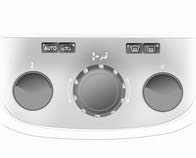
Electronic climate control system
Controls for:
■ Temperature
■ Air distribution and menu selection ■ Fan speed
AUTO = Automatic mode
 = Air recirculation
 = Demisting and defrosting
Heated rear window  .
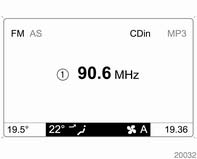
The preselected temperature is automatically regulated. In the automatic mode the fan speed and air distribution automatically regulate the air flow. The system can be manually adapted via the use of air distribution and air flow controls. Data is shown on the Info-Display. Setting modifications are briefly shown in the Info-Display, superimposing over the currently displayed menu. The electronic climate control system is only fully operational when the engine is running.
For correct operation do not cover the sensor on the instrument panel.
Automatic mode Basic setting for maximum comfort: ■ Press AUTO button. ■ Open all air vents. ■ Air conditioning on.■ Set desired temperature.
Temperature preselection Temperatures can be set to the disired value. For reasons of comfort, change temperature only in small increments. If the minimum temperature is set, Lo appears in the display and the electronic climate control system runs at maximum cooling.If the maximum temperature is set, Hi appears in the display and the electronic climate control system runs at maximum heating.
Fan speed The selected fan speed is indicated with and the number in the
display. If the fan is switched off the air conditioning is also deactivated.
To return to automatic mode: Press AUTO button.
Demisting and defrosting the windows Press the button.
 appears in
the display. Temperature and air distribution are set automatically and the fan runs at a high speed. To return to automatic mode: press button
 or AUTO.
Switch on heated rear window  .
Manual settings in climate menu Climate control system settings can be changed via the centre control, the buttons and the menus shown on the display. To view the menu, press the centre control. The Climate menu appears in the display. Individual menu items are marked by turning the centre control and selected by pressing it.
To exit a menu, turn the centre control until Return or Main appear and select.
Air distribution Turn the centre control. The Air distribut. menu is activated, showing the possible air distribution settings: Top = to windscreen and front door windows. Centre = to vehicle occupants. Bottom = to foot well. The Air distribut. menu can also be called up via the Climate menu.Return to automatic air distribution: Deactivate corresponding setting or press button AUTO.
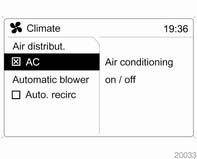
Cooling In the Climate menu, select menu item AC and activate or deactivate cooling. The air conditioning system cools and dehumidifies (dries) when outside temperature is above a specific level. Therefore condensation may form and drip from under the vehicle.
If no cooling or drying is required, switch the cooling system off to save fuel, Eco appears in the display.
Fan regulation in automatic mode Fan regulation in automatic mode can be adapted.Select menu item Automatic blower from the Climate menu and select the desired fan regulation.
Manual air recirculation modeThe manual air recirculation mode is operated with the button.
Warning:
The exchange of fresh air is reduced in air recirculation mode.
In operation without cooling the air humidity increases, so the windows may mist up. The quality of the passenger compartment air deteriorates, which may cause the vehicle occupants to feel drowsy.
Test yourself
A quick Opel Corsa quiz: every answer comes with an explanation and a link to the manual page.