Light switches
The lighting control dial and the front and rear light switches provide lighting for the vehicle.
Main lighting
The different types of front and rear lights are designed to progressively adapt the driver's visibility to weather conditions:
- position lamps, to be seen,
- dipped beam headlamps, to see and not dazzle other drivers,
- main beam headlamps, to see well on an empty road.
Additional lighting
The vehicle also has other lights adapted to specific road conditions:
- rear fog lamp, to be seen from a distance,
- front fog lamps, to light the road even better.
Programming
The vehicle also has automatic lighting functions linked to the following options:
- follow-me-home lighting,
- automatic lighting
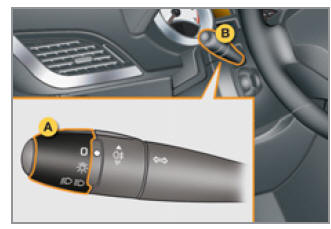
Model without AUTO lights activation
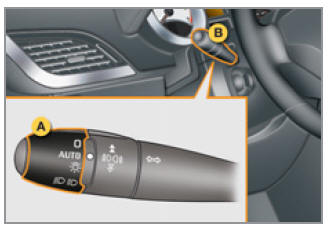
Model with AUTO lights activation
Manual switches
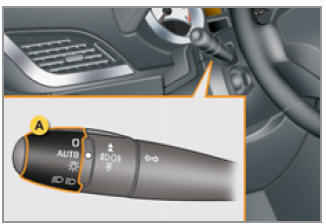
The lighting is controlled directly by the driver using ring A and switch B.
- Main lighting mode selection ring:
 lights off,
 parking lights only,
 dipped or main beam headlights,
 automatic light activation.
- switching between dipped and main beam: pull the switch.
In the lights off and parking lights modes, the driver can switch on the main beam directly ("flashing the headlights") by pulling the switch towards themselves.
Indication
The corresponding indicator lamp lighting up in the instrument cluster confirms that the selected lighting is on.
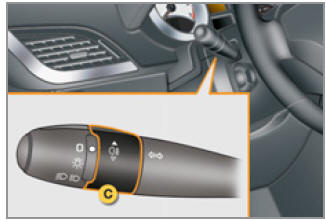
Model equipped with rear fog lights only
Model equipped with front and rear fog lights
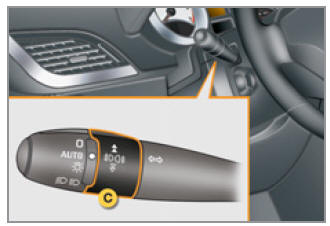
- Fog light selection ring.
Works with the dipped and main beam headlights.
 Rear fog lights
To switch on the fog lights, turn ring C forwards.
When the lights switch off automatically (AUTO mode), the fog lights and dipped headlights remain on.
To switch off all lights, turn ring C backwards.
 front
and rear fog lights
To switch on the fog lights, turn ring C forwards.
To switch off the rear fog lights, turn ring C back two clicks.
When the lights switch off automatically (AUTO mode), or when the dipped headlights are switched off manually, the fog lights and parking lights remain on.
Turn the ring backwards to switch off the fog lights; the parking lights also go off.
In good weather or rain, both day and night, do not switch on the front and rear fog lamps. In such conditions, the light output may dazzle other drivers.Switch off the front and rear fog lights when they are no longer needed.
Lights-on warning buzzer A warning tone sounds when the front door is opened, to alert the driver that the lights are still on with the ignition off. In this case, switching the lights off will stop the tone.If the dipped headlights remain on after the ignition is switched off, they switch off automatically after thirty minutes to prevent the battery from discharging.
Daytime running lights
On vehicles equipped with daytime running lights, the dipped headlights come on when the vehicle is started.
 The corresponding indicator lamp
lights up in the instrument cluster.
The driver's area (multifunction display, climate control panel, ...) is not illuminated, except when automatic lighting or manual lighting is switched on.
Follow-me-home lighting
Temporarily keeping the dipped headlights on after the ignition is switched off makes it easier to leave the vehicle in poor external light.
Activation
- With the ignition off, flash the headlights using switch B.
- Flashing the headlights again switches the function off.
Deactivation
Follow-me-home lighting switches off automatically within a few dozen seconds after the doors are locked.
Automatic light activation
The parking lights and dipped headlights come on automatically, without driver intervention, when natural light is poor (sensor behind the interior rear-view mirror) or when the windscreen wipers are switched on.
They go off when the lighting is sufficient or when the wipers are switched off.
Activation
- Set ring A to the " AUTO " position. A message appears on the multifunction display when the lights switch on automatically.
Deactivation
- Set ring A to any position other than " AUTO ". A message appears on the multifunction display when the automatic lighting is switched off.
Link with follow-me-home lighting
Combining with automatic lighting provides additional follow-me-home options:
- selecting the follow-me-home duration: 15, 30 or 60 seconds, set in the vehicle parameters in the configuration menu on the multifunction display
- automatic activation of follow-me-home lighting when automatic lighting is active.
Fault
 If the light sensor is faulty, the lights come on, the service indicator lamp lights up, a warning tone sounds, and the multifunction display shows the message Have the system checked at a PEUGEOT dealership or a specialist workshop.
Do not cover the light sensor, which is combined with the rain sensor and located on the windscreen behind the interior rear-view mirror; the functions linked to it will not be able to operate.
Test yourself
A quick Peugeot 207 quiz: every answer comes with an explanation and a link to the manual page.