Instruments and controls
Information display
In this manual: Instruments and controls
~1min read
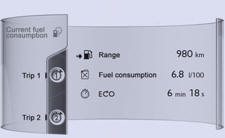
 Press MODE located on the touch screen front panel, to display the various tabs.
Select the desired tab using your finger.
 The current information tab with:
● the range,
● the current fuel consumption,
● the Stop & Start time counter.

The trip "1" tab with:
● the distance travelled.
● the average fuel consumption,
● the average speed, for the first trip.
 The trip "2" tab with:
● the distance travelled.
● the average fuel consumption,
● the average speed, for the second trip.
Test yourself
A quick Peugeot 208 quiz: every answer comes with an explanation and a link to the manual page.
Was this page helpful?