Memory function
The Subaru Ascent power rear gate is equipped with a convenient memory function that allows you to store a preferred opening height for everyday use. This feature is especially useful in garages or areas with limited vertical clearance.
Registration of the rear gate height
To set and save your desired Subaru Ascent rear gate height, follow these steps carefully:
1. Open the rear gate and manually stop it at your preferred height.
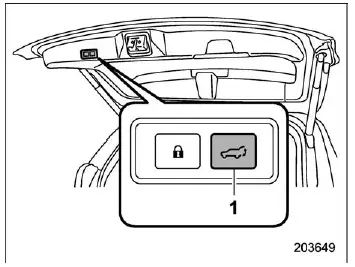
- Power rear gate button
2. Press and hold the Subaru Ascent power rear gate button until you hear an electronic confirmation chirp and see the hazard warning flashers blink. This indicates that the selected height has been successfully stored.
Once activated, the Subaru Ascent rear gate will automatically stop at the registered height each time it is opened.
NOTE
- Registering a height automatically enables the Subaru Ascent "Power Rear Gate Memory" function.
- To update the stored height, simply repeat the same procedure with a new position.
- The minimum configurable height is approximately 2 inches (5 cm) above the fully closed position.
Deactivation of the memory function
To restore full opening of the Subaru Ascent rear gate, disable the memory function using one of the following methods:
- Turn off the "Power Rear Gate Memory" setting via the center information display.
- Register the fully open position as the new stored height.
Utilizing the memorized rear gate height
To open the Subaru Ascent rear gate to the saved height:
1. Ensure that the "Power Rear Gate Memory" function is activated.
2. Press and hold any Subaru Ascent power rear gate control button.
NOTE
The Subaru Ascent rear gate will open to the stored height even if it is activated via reverse function or other automatic operations.