Audio
Audio settings (type D audio)
In this manual: Audio
~1min read
1. Press the “TUNE/TRACK/CH” dial to display “SETTING Menu”.
2. Operate the “TUNE/TRACK/CH” dial to select the preferred menu. You can select the menu as shown in the following chart.
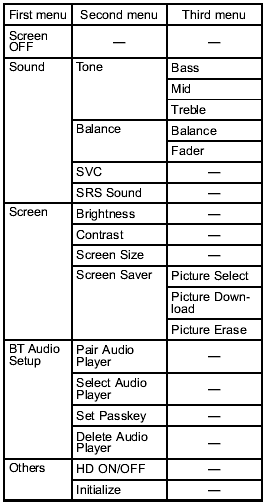
3. Operate the “TUNE/TRACK/CH” dial to select the preferred setting for each mode.
Test yourself
A quick Subaru Forester quiz: every answer comes with an explanation and a link to the manual page.
Was this page helpful?