Connecting USB storage device / iPod®

• If the data stored in an iPod® is deleted while it is connected to the in-vehicle system, the data cannot be recovered.
• Do not store an iPod® in the vehicle. If an iPod® is left in the vehicle for a long period of time, it may be deformed, discolored or damaged by high temperature.
• A movie cannot be played while an iPod® is connected.
• While an iPod® is connected, the iPod® cannot be operated using the click wheel on the iPod®. However, touch panel equipped models can be operated.
• When using an iPod® by connecting it to in-vehicle equipment, the order of the list items displayed on the invehicle equipment may be different from that on the iPod®. However, this does not indicate a malfunction.
• An iPod® battery that is connected to in-vehicle equipment will be charged when the ignition switch is in the “ON” or “Acc” position. However, activation of the iPod® may be delayed if the battery charge of the iPod® is low.
• If an iPod® does not activate after operation, disconnect the connection cable from the iPod® and reset it. For the resetting procedure, see the User’s Guide that comes with the iPod®.
• If an iPod® and the connection cable are connected improperly, the iPod® cannot be powered on or will not be recognized by in-vehicle equipment. In this case, disconnect the connection cable from the iPod®, and then connect it again.
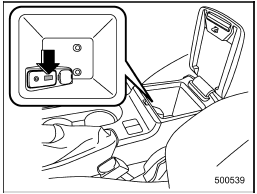
Except STI
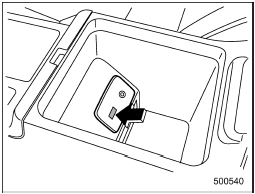
STI
The USB connector is located in the center console. Use the connector to connect a USB storage device / iPod®.
Test yourself
A quick Subaru Impreza quiz: every answer comes with an explanation and a link to the manual page.