Starting and operating
To decrease the speed (by button)
In this manual: Starting and operating
~1min read
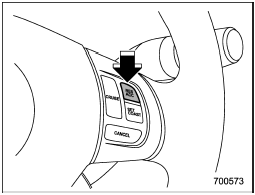
To decrease the speed (by button)
Push the “SET/COAST” button and hold it until the vehicle reaches the desired speed. Then, release the button. The vehicle speed at that moment will be memorized and treated as the new set speed.
When the difference between the actual vehicle speed and the set speed is less than 6,8 km/h, the set speed can be lowered 1,6 km/h each time by pressing the “SET/COAST” button quickly.
Test yourself
A quick Subaru Impreza quiz: every answer comes with an explanation and a link to the manual page.
Was this page helpful?