Audio
Folder selection
In this manual: Audio
~1min read
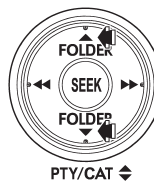
Press the “
 ” side of the “FOLDER”
button briefly to select the next folder.
Press the “ ” side of the button briefly
to go back to the previous folder.
NOTE
● Selecting folders in this way is possible only within a single disc.● Only MP3/WMA/AAC folders are recognized when an attempt to select the next or previous folder is made. If no appropriate folder exists on the disc, pressing the “ ” or “
 ”
side of the “FOLDER” button starts playback beginning with the first track/file (track).
Test yourself
A quick Subaru Legacy quiz: every answer comes with an explanation and a link to the manual page.
Was this page helpful?