“up” and “down” switch
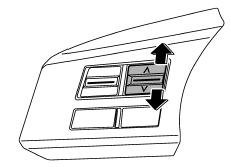
With radio mode selected
Press the switch to the “ ” or “
 ”
side briefly to skip to a preset channel. Press the switch to the “”
or “” side for more than 0.5 second
to seek the next receivable station and stop at it.
That station’s frequency will be indicated on the audio display.
With CD mode selected
Press the switch to the “” side
to skip forward in the track/file (track) order. Press the switch to the “”
side to skip back ward in the track/file (track) order. The track/file (track) number will be shown on the audio display.
With SAT mode selected
Press the switch to the “” side
to skip forward in the channel order. Press the switch to the “”
side to skip backward in the channel order. When the switch is briefly pressed, the channel will skip every 1 channel. When the switch is pressed for more than 0.5 second, the channel will skip every 10 channels. The channel will be shown on the audio display.
Test yourself
A quick Subaru Legacy quiz: every answer comes with an explanation and a link to the manual page.