Headlight aim
Vertical movement adjusting bolts
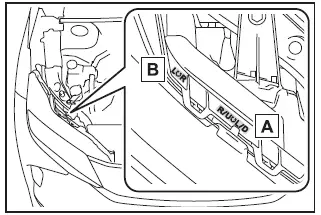
- Adjustment bolt A
- Adjustment bolt B
Before checking the headlight aim
- Park your Subaru Solterra on a flat, level surface.
- Ensure all tires are inflated to the recommended pressure.
- Have a person seated in the driver’s seat to simulate normal driving conditions.
- Gently bounce the vehicle several times to stabilize suspension position.
Adjusting the headlight aim
1. Using a Phillips-head screwdriver, rotate adjustment bolt A in the required direction.
Take note of both the rotation direction and the number of turns for accurate adjustment.

2. Adjust bolt B by turning it the same number of rotations and in the same direction as performed in step 1 to maintain alignment consistency in the Subaru Solterra.
If proper adjustment cannot be achieved using this method, have the Subaru Solterra inspected and adjusted by a SUBARU dealer.

Light bulbs
If any exterior lighting component on the Subaru Solterra fails to operate, it is recommended to have it replaced by an authorized SUBARU dealer.
■ LED lights
The lighting system of the Subaru Solterra uses multiple LED elements. If one or more LEDs fail, the entire unit may require replacement by a qualified technician.
■ Condensation build-up on the inside of the lens
Temporary condensation inside the headlight housing of the Subaru Solterra is generally normal and does not indicate a malfunction.
However, contact your SUBARU dealer if you observe any of the following conditions:
- Large water droplets forming inside the lens
- Visible accumulation of water within the headlight assembly
Test yourself
A quick Subaru Solterra quiz: every answer comes with an explanation and a link to the manual page.