Accessory meter light control
The daytime brightness of the accessory meter can be adjusted.
 Turn the headlight switch off.
 Press and hold the “MODE/
 ” button.
 Press the “MODE/ ” or “SET/
 ” button.
Vehicles without Multi-terrain Select
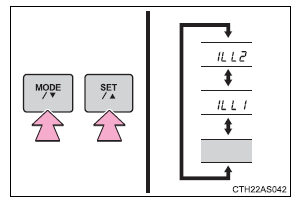
Vehicles with Multi-terrain Select
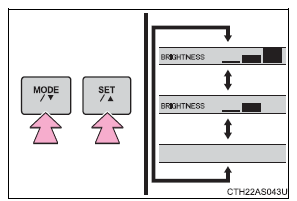
 Press and hold the “SET/ ” button.
When the average fuel consumption is reset The average fuel consumption displayed on the instrument cluster and “Past Record” screen of the Display Audio system (if equipped) or the navigation system (if equipped) will be reset at the same time. Adjusting the brightness of the accessory meter • If left idle for approximately 6 seconds or more while adjusting, the display will revert to the trip information display. • When the parking lights are on, the brightness of the accessory meter can be adjusted only with the instrument panel light control.
• If the “MODE/ ” button is pressed
and held when the accessory meter light control is displayed, the display will switch to compass calibration.
Small spots or light spots may appear on the display. This phenomenon is characteristic of liquid crystal displays, and there is no problem with continuing to use the display.
NOTICE
The accessory meter at low temperaturesAllow the interior of the vehicle to warm up before using the liquid crystal display.
At extremely low temperatures, the display monitor may respond slowly, and display changes may be delayed.
Test yourself
A quick Toyota 4Runner quiz: every answer comes with an explanation and a link to the manual page.