Reassembly
1. INSTALL KEY INTERLOCK SOLENOID WIRE (w/o Smart Key System)
(a) Install the key interlock solenoid wire on to the install the ignition switch.
2. INSTALL IGNITION SWITCH ASSEMBLY (w/o Smart Key System)
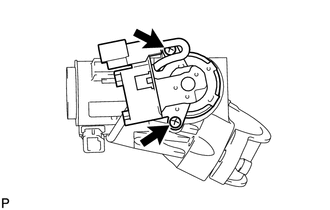
(a) Install the ignition switch onto the steering column upper bracket with the 2 screws. |
 |
3. INSTALL KEY INTERLOCK SOLENOID (w/o Smart Key System)
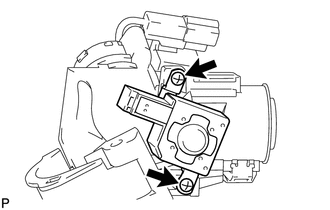
(a) Install the key interlock solenoid onto the steering column upper bracket with the 2 screws. |
 |
(b) Connect the connector.
4. INSTALL UNLOCK WARNING SWITCH ASSEMBLY (w/o Smart Key System)
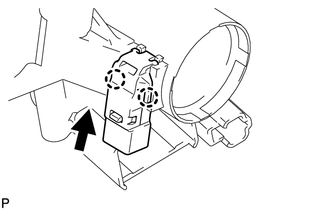
(a) Attach the 2 claws to install the unlock warning switch onto the steering column upper bracket. HINT: Slide the unlock warning switch in the direction shown by the arrow in the illustration to install it. |
 |
5. INSTALL IGNITION SWITCH LOCK CYLINDER ASSEMBLY (w/o Smart Key System)
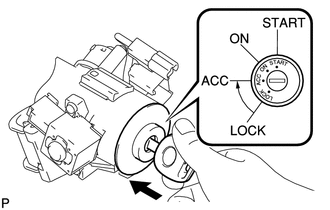
(a) Turn the ignition switch to ON (ACC).
(b) Install the ignition switch lock cylinder into the steering column upper bracket. |
 |
(c) Make sure that the ignition switch lock cylinder is securely fixed onto the ignition switch lock cylinder.
6. INSPECT STEERING LOCK OPERATION (w/o Smart Key System)
(a) Remove the key and check that the steering lock function is activated. |
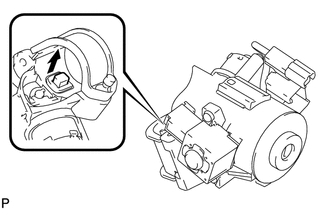 |
(b) Insert the key, turn the ignition switch ON (ACC) and check that the steering lock function is deactivated. |
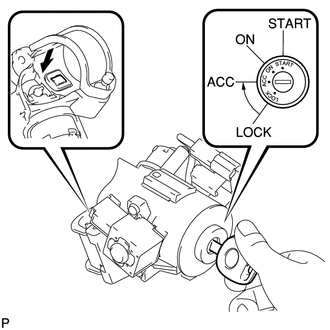 |
7. INSTALL STEERING LOCK ACTUATOR ASSEMBLY
HINT:
When replacing the steering lock actuator assembly (w/ smart key system), perform key registration (See page  ).
(a) Temporarily install the steering lock actuator assembly with a new tapered-head bolt.
(b) Tighten the tapered-head bolt until the bolt head breaks off. Text in Illustration
|
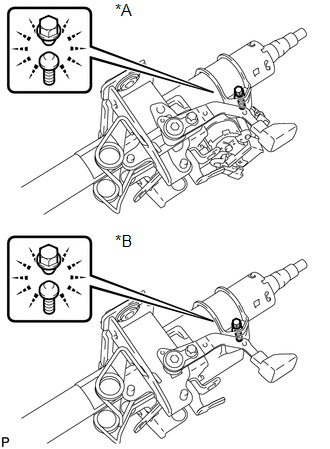 |
Test yourself
A quick Toyota 4Runner quiz: every answer comes with an explanation and a link to the manual page.