Switching the display
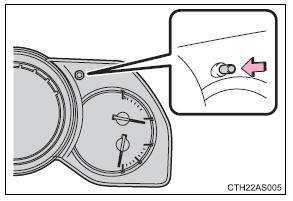
Items displayed can be switched by pressing the display change button.
Odometer Displays the total distance the vehicle has been driven. Trip meter Displays the distance the vehicle has been driven since the meter was last reset. Trip meters “A” and “B” can be used to record and display different distances independently.Pressing and holding the display change button will reset the trip meter that is currently displayed.
Eco Driving Indicator and average fuel consumption Non-Optitron type meter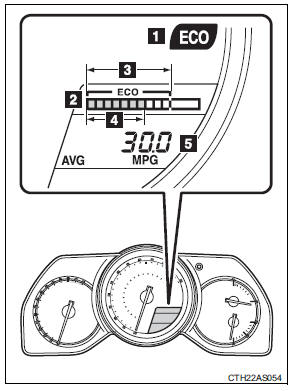
1. Eco Driving Indicator Light During Eco-friendly acceleration (Eco driving), Eco Driving Indicator Light will turn on.
2. Eco Driving Indicator Zone Display Suggests Zone of Eco driving with current Eco driving ratio based on acceleration.
3. Zone of Eco driving 4. Eco driving ratio based on acceleration In case over-use of the accelerator causes the vehicle to exceed Zone of Eco driving, the right of Eco Driving Indicator Zone Display will blink and Eco Driving Indicator Light will turn off.
5. Average fuel consumption Displays the average fuel consumption since the function was reset.
Pressing and holding the display change button will reset the average fuel consumption.
Use the displayed average fuel consumption as a reference.
Optitron type meter
1. Eco Driving Indicator Light
During Eco-friendly acceleration (Eco driving), Eco Driving Indicator Light will turn on.
2. Eco Driving Indicator Zone DisplaySuggests Zone of Eco driving with current Eco driving ratio based on acceleration.
3. Zone of Eco driving 4. Eco driving ratio based onacceleration In case over-use of the accelerator causes the vehicle to exceed Zone of Eco driving, the right of Eco Driving Indicator Zone Display will blink and Eco Driving Indicator Light will turn off.
5. Average fuel consumptionDisplays the average fuel consumption since the function was reset.
Pressing and holding the display change button will reset the average fuel consumption.
Use the displayed average fuel consumption as a reference.
Eco Driving Indicator Light customization Non-Optitron type meter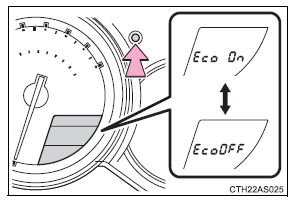
Eco Driving Indicator Light can be activated or deactivated by pressing and holding the display change button.
Optitron type meter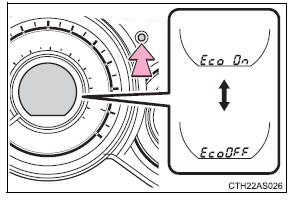
Eco Driving Indicator Light can be activated or deactivated by pressing and holding the display change button.
Test yourself
A quick Toyota 4Runner quiz: every answer comes with an explanation and a link to the manual page.