Using the interior lights
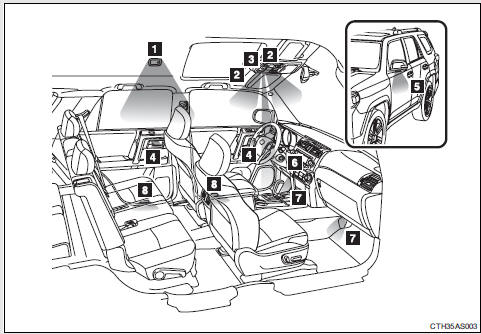
1. Rear interior light 2. Front interior light/front personal lights 3. Shift lever light (when the engine switch is in the “ACC” or “ON” position [without a smart key system] or “ENGINE START STOP” switch is in ACCESSORY or IGNITION ON mode [with a smart key system]) 4. Inside door handle lights (if equipped) 5. Outer foot lights (if equipped) 6. Engine switch light (vehicles without a smart key system) 7. Footwell lights (if equipped) 8. Door courtesy lights (if equipped)
Turning the instrument panel light control dial fully downward disables the inside door handle lights, footwell lights and shift lever light.
Interior lights Front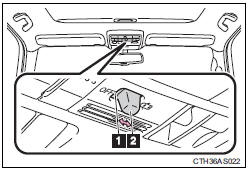
1. Turns the lights off 2. Turns the door position on
Rear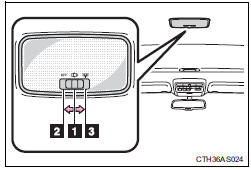
1. Turns the door position on 2. Turns the light off
3. Turns the light on
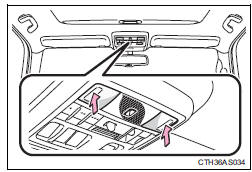
Turns the lights on/off
Illuminated entry system Vehicles without a smart key system The lights automatically turn on/off according to the engine switch position, whether the doors are locked/unlocked, and whether the doors are open/ closed. Vehicles with a smart key system he lights automatically turn on/off according to “ENGINE START STOP” switch mode, the presence of the electronic key, whether the doors are locked/unlocked, and whether the doors are open/closed. To prevent battery discharge If the following lights remain on, the lights will go off automatically after 20 minutes: • Engine switch light • Front interior light • Rear interior light • Personal light • Footwell lights • Inside door handle lights • Door courtesy lights Customization that can be configured at Toyota dealerSettings (e.g. the time elapsed before lights turn off) can be changed.
(Customizable features )
Test yourself
A quick Toyota 4Runner quiz: every answer comes with an explanation and a link to the manual page.